




The Need / Benefit
Organic community managed user groups must give group members the tools to privately within the group discuss and resolve topics and issues of concern to the group.
Such a discussion can be best supported by implementing a private forum for group members only.
Solution
Use the CB GroupJive solution and the Kunena forum extension and enable the built-in integration available.
One of the greatest built-in integrations available between Community Builder, GroupJive and Kunena, is the private discussion forum for groups integration.
This integration supports the following use case:
- Groups created in GroupJive will automatically trigger the creation of a new forum category under a configuration specified parent forum category in Kunena.
- Only group members will be able to see and post in such a groups discussion forum.
- The parent forum category will only be visible to users that have joined one of the GroupJive groups.
- Users will be only able to see the discussion categories for the groups they have joined.
Please note that any screenshots that follow were taken from a Joomla 2.5.7, CB 1.8.1, GroupJive 2.5.3, Kunena 2.0.2 environment.
Configuration of Kunena
Once your Kunena forum extension is installed and initially configured on your Joomla website, you can create a new top level forum category that will be used as a place holder for the GroupJive - Kunena intergation to create group discussion sub-category forums.
The steps to do this are:
- Joomla administration area: Components --> Kunena Forum --> Category Manager: New (+) icon
- Basic information tab: (see Figure 1 below)
- Parent: Top Level
- Name: Group Forum (or whatever makes sense for your use case)
- Published: Published
- Desciprion: Whatever description makes sense for your use case
- Category Header: Whatever dicription you want
- Permission tab: (see Figure 2 below)
- Access Control Type: Community Builder
- GroupJive Group: PLG_KUNENA_COMPROFILER_BO_GROUPS_FOUND
- Click the Save icon
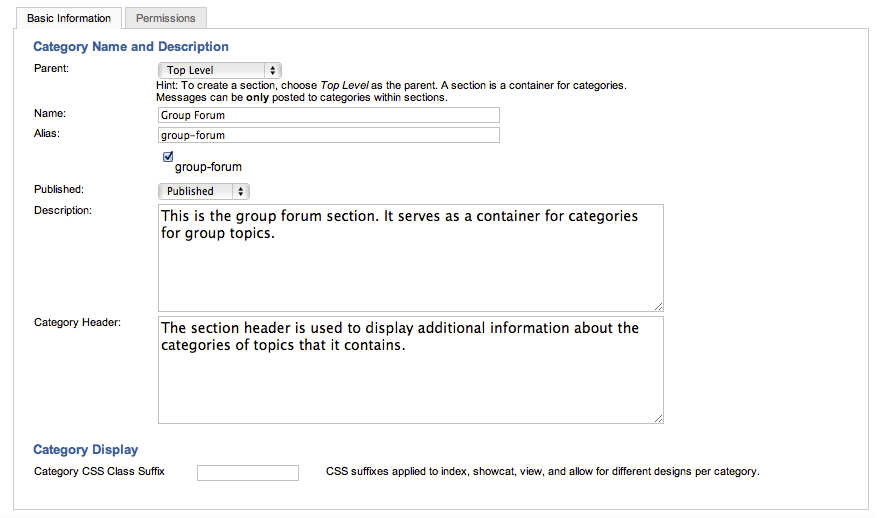
Figure 1: Kunena Category creation - Basic Information tab
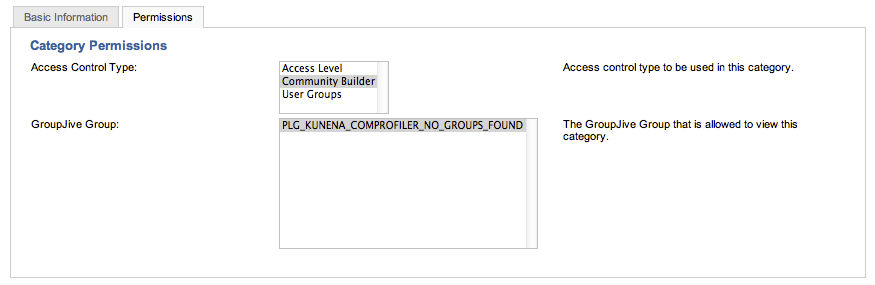
Figure 2: Kunena Category creation - Permissions tab
Configuration of GroupJive
After the creation of the top level forum category in Kunena, you need to instruct GroupJive to use this Kunena category for its group discussion forums.
The steps to do this are:
- Using the CB Admin Navigation menu in your Joomla administration area select:
GroupJive --> Configuration - Click on the Integrations tab
- CLick on the Forum sub-tab of the Integrations tab
- Click on the General sub-tab of the Forum tab
- In the Category parameter select the - Group Forum category from the drop-down list of available Kunena categories
- Click the Save disk icon in the GroupJive icon menu toolbar
These steps are shown in Figure 3 below.
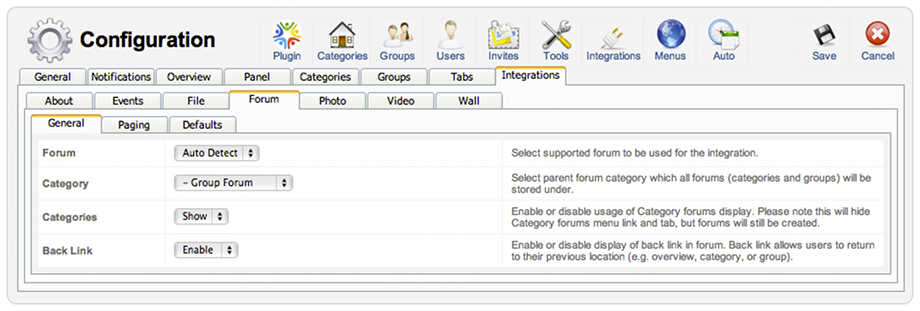
Figure 3: GroupJive Configuration panel - Integrations Tab - Forum sub-tab - General sub-tab
The Results
A user that does not belong to any GroupJive group - lets call him username = nogroups - will not be able to see our Kunena Group Forum tope level category area created earlier. This is shown in Figure 4 that follows.
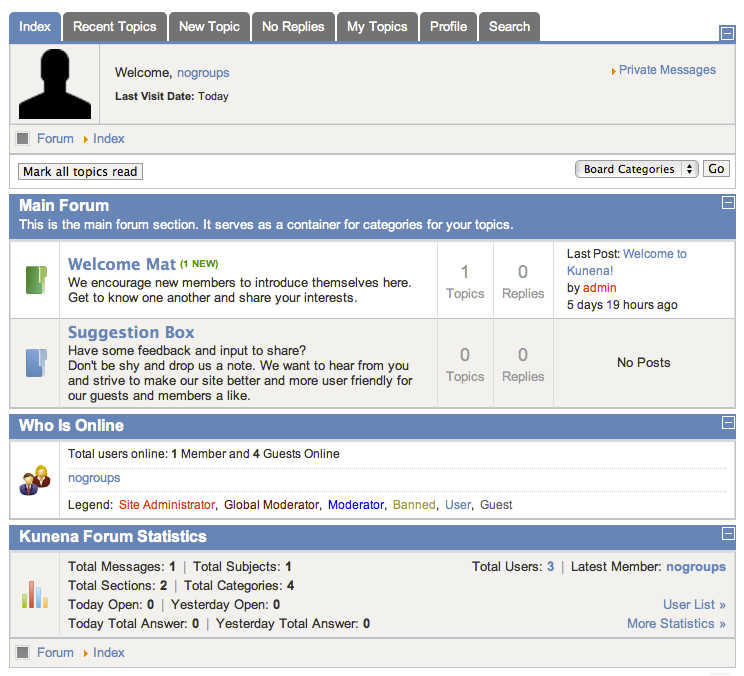
Figure 4: Kunena forum index when viewed by a user that has not joined any GroupJive groups
Now lets assume we have another user - with username = testuser - that is a member of a GroupJive group TEST GROUP that was created in a GroupJive category TEST CAT.
Such a user would have his CB Joined Groups tab on his profile similar to the screenshot shown in Figure 5 below.
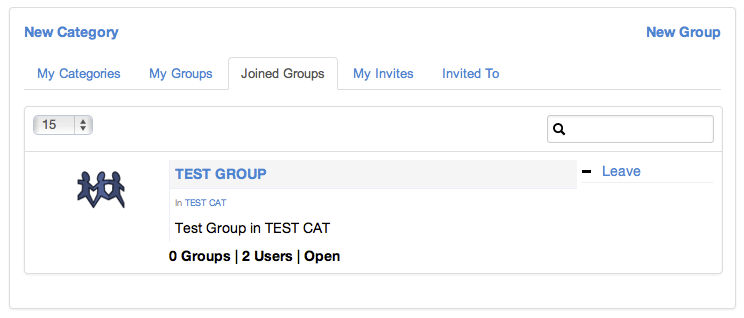
Figure 5: Joined Groups tab in a CB user profile - username testuser id a member of TEST GROUP
When username testuser visits the Kunena forum index area, he will see the Group Forum top-level category, the TEST CAT forum area and the TEST Group forum discussion area. This is illustrated in Figure 6 below.
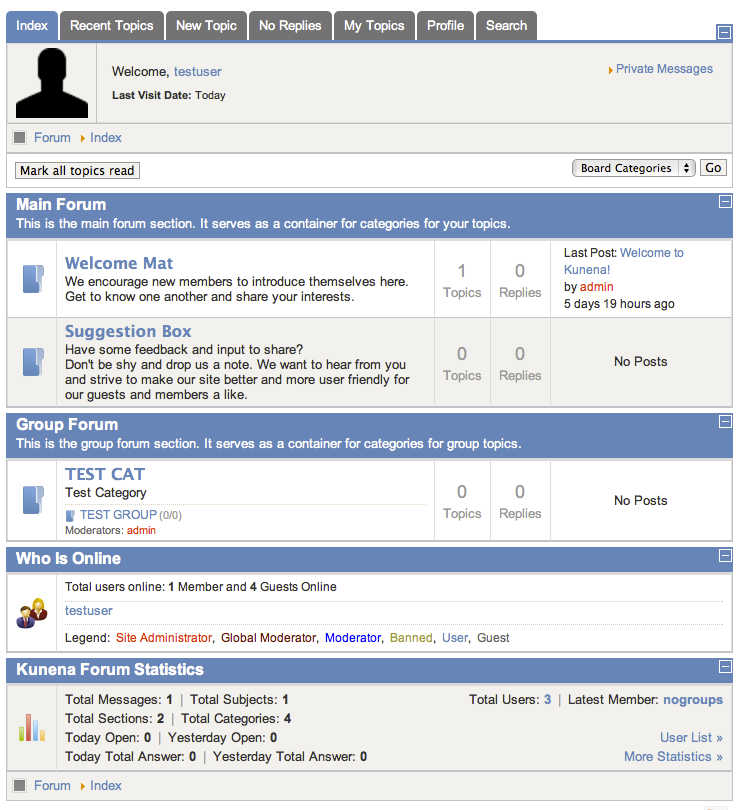
Figure 6: The Kunena forum index area when viewed by a group member will show the Group discussion areas that the user can access.
Conclusion
Private discussion forums are automatically create by the GroupJive-Kunena integration and can be used for great private discussions between group members.