

Continuing the more detailed description of items mentioned in the Work in progress article, one of the items mentioned is the CB Rating Field Plugin. This is another item that demonstrates the power of the CB 1.2 API. This field-type plugin adds another CB field type to the existing list of available field types.
This plugin is installed just like any other CB plugin via the CB Plugin Management backend. Once installed and published, website administrators will see an extra field type available when creating a new CB field in the CB Field Management backend – a Rating field.
A CB field of type ‘Rating field’ has a set of parameters that follows it in the right column area of the field management backend when editing or creating such a CB field. These extra parameters are illustrated in the following screenshot:
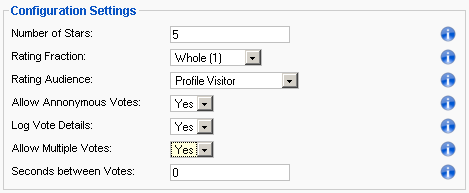
As you can see there are a number of nice parameters that can be applied to your specific field. You may SELECT the number of rating stars to show (5 is the value shown in the example). You may SELECT how the total rating is displayed (options are: Whole(1), Half(1/2), thirds(1/3), quarters(1/4)), the rating audience of the field (Profile Visitor or Profile Owner). This means that you can create a rating field that only the profile owner can rate - something like a 'how i see myself' rating field. You can specify if anonymous voting is allowed, if logging is enabled and if you want to allow multiple votes or not.
There is also a language string area that allows you to specify the wording that is to be used by the rating field. These text boxes can contain language strings (e.g., _UE_best, _UE_worst, etc) that are defined in your CB language plugin files for use in multiple language sites.

The result can be displayed on your profile just like any other CB field and the rating field can also be included during registration and in user lists!

You can create as many rating fields as you want. Example, rate my avatar, rate my resume, rate my forum activity, etc.
As mention in the “Work in Progress” article, this plugin at this time will be offered to documentation subscribers only after CB 1.2 is released.
{mos_sb_discuss:7}