Skip to Content Skip to Menu

Feature or Bug? in the context of deactivating / deleting the own user profile

1 week 3 days ago #344050 by erichburkhard
My environment: Joomla 5.4.6
CB: 2.11.0+build.2026.01.12.21.55.56.a25ef0f6c

I am not quite sure if the following behaviour is a feature or a bug. The scenarios is are as follows:

Scenario 1
1. Log in with your own user profile
2. Select the link: 'Delete account and profile'
3. You will get a confirmation email in your mail box .... and you have to click onto the embedded link in order to trigger the deletion process
4. Your profile will be deleted as expected an you will get again an email which informs you about this

Scenario 2
1. Log in with your own user profile
2. Select the link: 'Delete account and profile'
3. You will get an confirmation email in your mail box .... (don't click on it!!!)
4. Log out from the website first
5. Click now on the link within the confirmation email you got at step 3
6. Now the Login mask of the website appears with an alert that you have to be logged in
7. Log in to your website (according to the 'alert') ....... /** PS: your profile is still available **/
8. Click again onto the link within the confirmation email you got at step 3
9. Now you get the message on the screen that your user profile has been deleted
10. you also get an email which informs you about the successful deletion

Questions:
1. Why is it necessary that the user has to be logged in while clicking onto this confirmation link? Of course you can say that this is an additional security feature ... BUT ... this user knows his credentials for sure, because without the log in to the website with these (correct) credentials he would not have been capable to trigger the corresponding confirmation email (for the deletion)
2. Let assume that the scenario 2 is correct: As soon as the user logs in at step 7 (according to the alert in step 6) the deletion process should be continued automatically .... but this is not the case: The user has to 'trigger' this deletion process for a second time by clicking onto the link in the confirmation email

So I am not sure if scenario 2 is a bug or a feature

regards

Please Log in or Create an account to join the conversation.

  • krileon
  • krileon
  • ONLINE
  • Posts: 50503
  • Thanks: 8641
  • Karma: 1472
1 week 2 days ago #344055 by krileon
Login isn't required. Access to CB is the only requirement. Check the Itemid in the URL or the menu-alias in the URL and find what menu item it's trying to use as Joomla ACL is probably blocking access.


Kyle (Krileon)
Community Builder Team Member
Before posting on forums: Read FAQ thoroughly + Read our Documentation + Search the forums
CB links: Documentation - Localization - CB Quickstart - CB Paid Subscriptions - Add-Ons - Forge
--
If you are a Professional, Developer, or CB Paid Subscriptions subscriber and have a support issue please always post in your respective support forums for best results!
--
If I've missed your support post with a delay of 3 days or greater and are a Professional, Developer, or CBSubs subscriber please send me a private message with your thread and will reply when possible!
--
Please note I am available Monday - Friday from 8:00 AM CST to 4:00 PM CST. I am away on weekends (Saturday and Sunday) and if I've missed your post on or before a weekend after business hours please wait for the next following business day (Monday) and will get to your issue as soon as possible, thank you.
--
My role here is to provide guidance and assistance. I cannot provide custom code for each custom requirement. Please do not inquire me about custom development.

Please Log in or Create an account to join the conversation.

1 week 1 day ago #344062 by erichburkhard
Hi - you were right - it is the Joomla ACL which blocks the deletion for users who are not logged in BUT ... I still have no clue how to fix it. But let me explain step by step what happens when a users decides to delete his own profile:

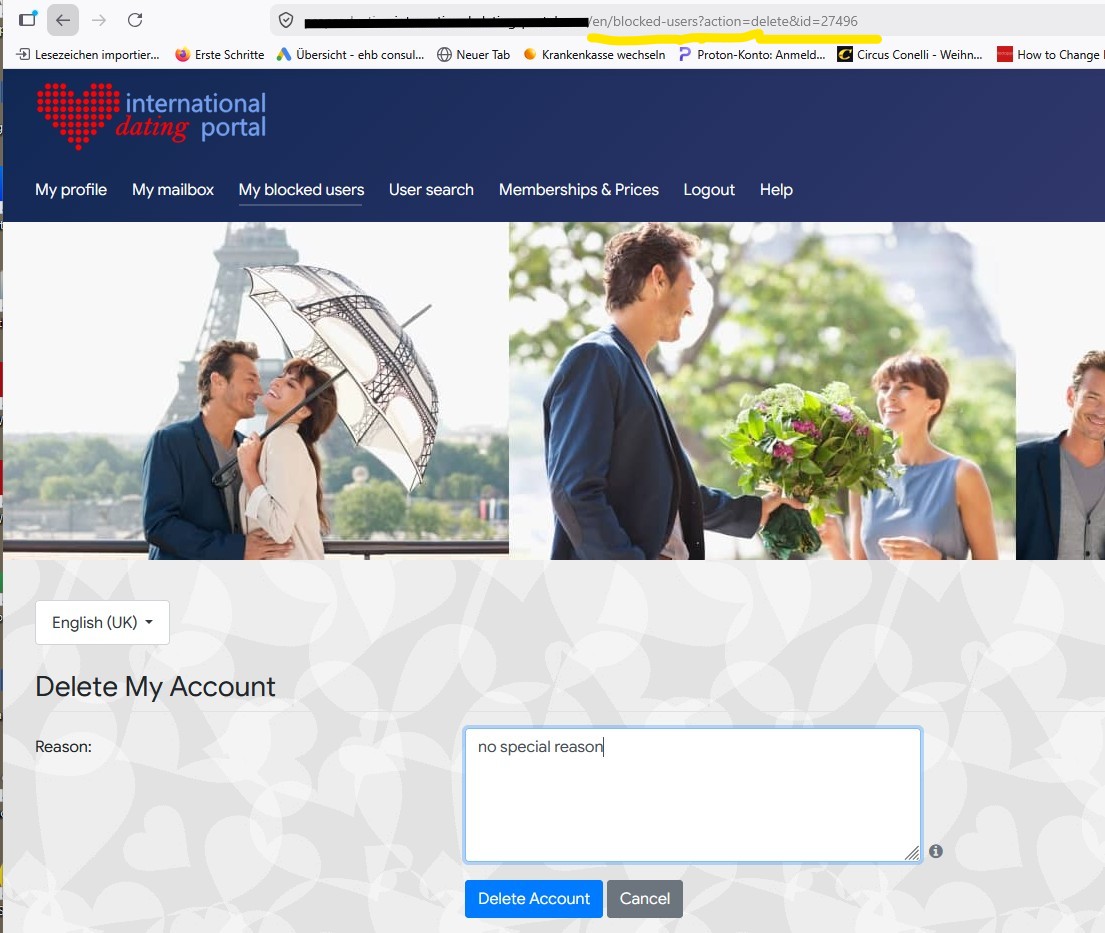
1. As soon as a logged in user decides to delete his own profile the following window appears, where the user has to enter the reason for the deletion:
 
.... at the page heading you see that the String '/blocked-users' is part of this URL   /** this will become important later **/

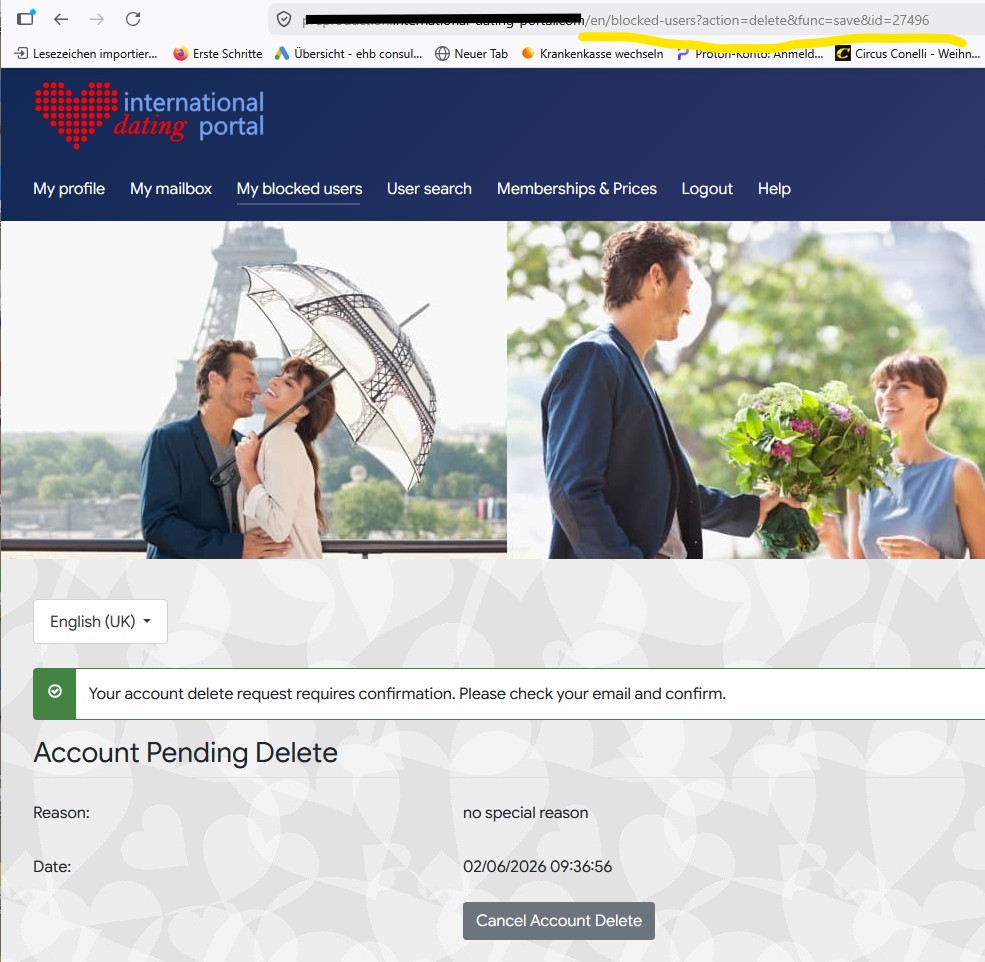
2. Now the user gets a confirmation (screen) which looks like this
       /** here again the string '/blocked-users' is part of the URL **/

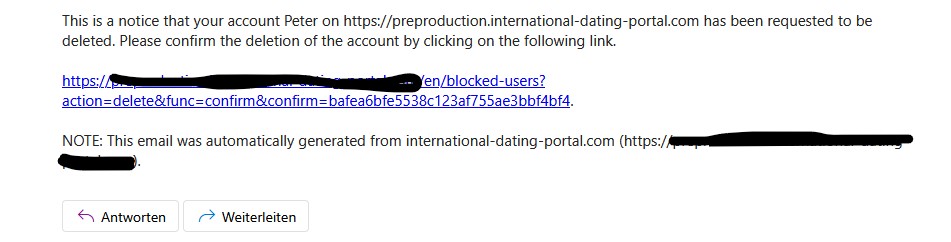
3. Now the user opens his mailbox in order to click onto the confirmation link
            /** here again the string '/blocked-users' is part of the confirmation link **/

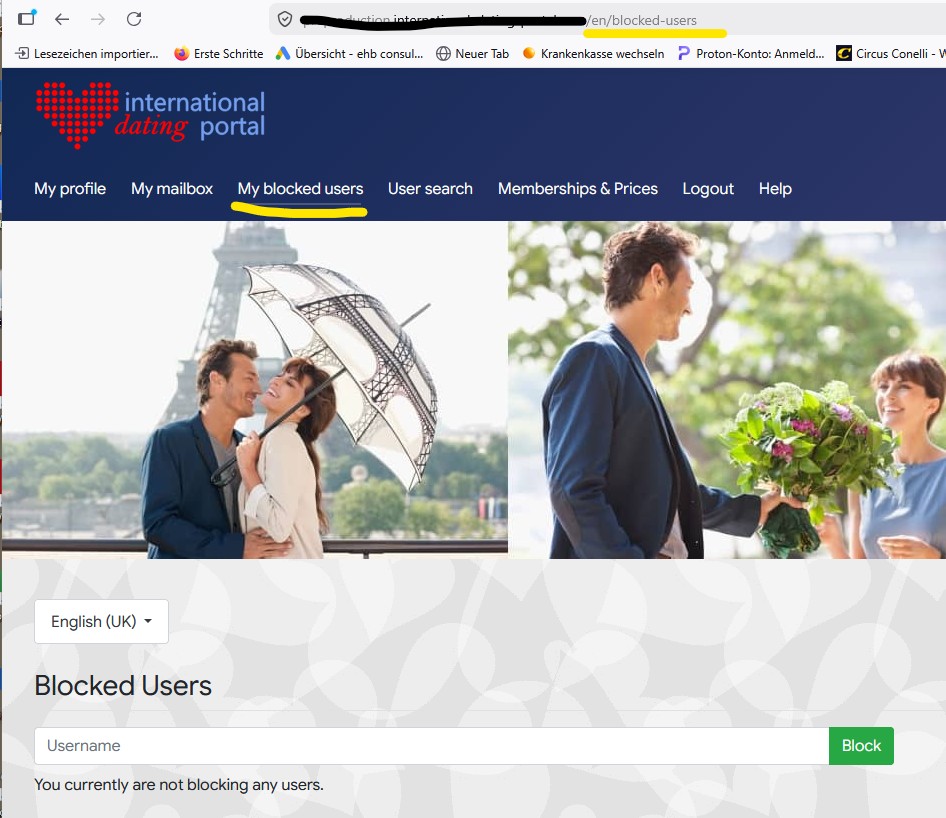
4. Now the uers tries to click onto this confirmation link but it will not work because I also have a menu item called 'My blocked users' and this menu item shall only be visible for users who are logged in:
 
... as soon as the user is logged in, the URL part '/blocked-users' is 'accessible' and the profile will be deleted

..... So the good news is that reason for this behaviour on my website is explainable.... but at the moment I don't know how to fix it, because the menu item 'My blocked uers' is not allowed to be public on my website

regards

Please Log in or Create an account to join the conversation.

  • krileon
  • krileon
  • ONLINE
  • Posts: 50503
  • Thanks: 8641
  • Karma: 1472
1 week 1 day ago #344063 by krileon
Create a Joomla menu item with a menu type of Community Builder > Plugin then select "CB Privacy" for "Plugin". Next select "Delete Account" for "Action" and set it as public. Then you'll need to retry sending the delete account confirmation and see if it's now using that menu item. Note that menu item doesn't need to be visible.


Kyle (Krileon)
Community Builder Team Member
Before posting on forums: Read FAQ thoroughly + Read our Documentation + Search the forums
CB links: Documentation - Localization - CB Quickstart - CB Paid Subscriptions - Add-Ons - Forge
--
If you are a Professional, Developer, or CB Paid Subscriptions subscriber and have a support issue please always post in your respective support forums for best results!
--
If I've missed your support post with a delay of 3 days or greater and are a Professional, Developer, or CBSubs subscriber please send me a private message with your thread and will reply when possible!
--
Please note I am available Monday - Friday from 8:00 AM CST to 4:00 PM CST. I am away on weekends (Saturday and Sunday) and if I've missed your post on or before a weekend after business hours please wait for the next following business day (Monday) and will get to your issue as soon as possible, thank you.
--
My role here is to provide guidance and assistance. I cannot provide custom code for each custom requirement. Please do not inquire me about custom development.

Please Log in or Create an account to join the conversation.

23 hours 50 minutes ago #344100 by erichburkhard
OK - this works. Also the 'switch' between the different site-languages work well . That means if I choose:

My profile / Update your profile / Delete account and profile ...... and switch to another site language, then  the correct an corresponding page for the reason of the deletion appears in the chosen language. So far so good. 

Now I have created another Joomla menu item in the same manner you told me, but for the 'Disable Account'  link ..... If I do this I encounter the problem that the system gets confused when changing the site- language

Scenario.:
My profile / Update your profile / Disable account, profile, and related features.  .... now the page for entering the reason for the disabling appears ... this is correct.... but - for example - If I change now  the site language to another one it can happen (sometimes ?!?)  that the page for entering the reason for the deletion appears and not the corresponding page (in the chosen language) for the disabling 

I don't know how to fix this

reagards

Please Log in or Create an account to join the conversation.

  • krileon
  • krileon
  • ONLINE
  • Posts: 50503
  • Thanks: 8641
  • Karma: 1472
21 hours 56 minutes ago #344102 by krileon
Is it normal for your users to just be switching languages constantly on random pages like that though? Joomla's language switcher is.. not good. It is entirely dependent on menu items as you've seen and it isn't very reliable in doing that. Ideally it should just be taking the existing decoded SEO URL, replacing &lang, and redirecting to that, but it unfortunately doesn't. There isn't anything I can really do about language switcher weirdness. I would recommend only displaying the language switcher on selective pages instead of every page.


Kyle (Krileon)
Community Builder Team Member
Before posting on forums: Read FAQ thoroughly + Read our Documentation + Search the forums
CB links: Documentation - Localization - CB Quickstart - CB Paid Subscriptions - Add-Ons - Forge
--
If you are a Professional, Developer, or CB Paid Subscriptions subscriber and have a support issue please always post in your respective support forums for best results!
--
If I've missed your support post with a delay of 3 days or greater and are a Professional, Developer, or CBSubs subscriber please send me a private message with your thread and will reply when possible!
--
Please note I am available Monday - Friday from 8:00 AM CST to 4:00 PM CST. I am away on weekends (Saturday and Sunday) and if I've missed your post on or before a weekend after business hours please wait for the next following business day (Monday) and will get to your issue as soon as possible, thank you.
--
My role here is to provide guidance and assistance. I cannot provide custom code for each custom requirement. Please do not inquire me about custom development.

Please Log in or Create an account to join the conversation.

Moderators: beatnantkrileon
Powered by Kunena Forum