Skip to Content Skip to Menu

CBSubs: Stripe payments show user id, not real name

  • jhaines
  • jhaines
  • ONLINE
  • Posts: 88
  • Thanks: 10
  • Karma: 3
1 day 23 hours ago - 1 day 23 hours ago #342630 by jhaines
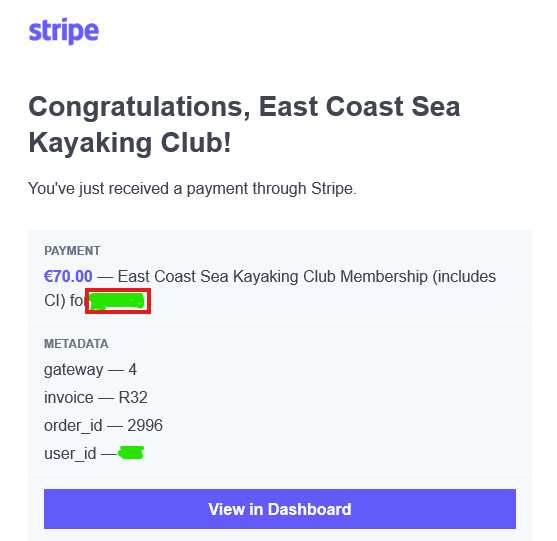
Stripe payment notification emails from the club website show the payee by their user name and not by their real name. That's a problem for the treasurer or anyone without access to the back-end and an inconvenience for all because we don't display user names. Payments to the same Stripe account from Squarespace don't show this problem. Neither do Paypal payment notifications also from the club website using the CBSubs gateway. It looks like it must be a feature of the CBSubs Stripe gateway specifically, which is inconsistent with the equivalent Paypal gateway. There doesn't seem to be anything in the back end to configure this behaviour.

 
Last edit: 1 day 23 hours ago by jhaines.

Please Log in or Create an account to join the conversation.

  • krileon
  • krileon
  • ONLINE
  • Posts: 49856
  • Thanks: 8517
  • Karma: 1465
1 day 5 hours ago #342636 by krileon
That's the "Payment item text" parameter under the Pricing tab of your plans. That's sent to payment processors and can be customized to include whatever you like (e.g. replace [username] with [name]). Its default value is as follows.

Default
Code:
[PREFIX_TEXT] [ITEM_NAME][VALIDITY_IF_NOT_AUTORECURRING] for [USERNAME]

Change To
Code:
[PREFIX_TEXT] [ITEM_NAME][VALIDITY_IF_NOT_AUTORECURRING] for [NAME]


Kyle (Krileon)
Community Builder Team Member
Before posting on forums: Read FAQ thoroughly + Read our Documentation + Search the forums
CB links: Documentation - Localization - CB Quickstart - CB Paid Subscriptions - Add-Ons - Forge
--
If you are a Professional, Developer, or CB Paid Subscriptions subscriber and have a support issue please always post in your respective support forums for best results!
--
If I've missed your support post with a delay of 3 days or greater and are a Professional, Developer, or CBSubs subscriber please send me a private message with your thread and will reply when possible!
--
Please note I am available Monday - Friday from 8:00 AM CST to 4:00 PM CST. I am away on weekends (Saturday and Sunday) and if I've missed your post on or before a weekend after business hours please wait for the next following business day (Monday) and will get to your issue as soon as possible, thank you.
--
My role here is to provide guidance and assistance. I cannot provide custom code for each custom requirement. Please do not inquire me about custom development.

Please Log in or Create an account to join the conversation.

  • jhaines
  • jhaines
  • ONLINE
  • Posts: 88
  • Thanks: 10
  • Karma: 3
22 hours 41 minutes ago #342642 by jhaines
Thanks. I've checked the plan and it's configured as you say already. That doesn't surprise me because we have options to pay for the same plan either using Stripe, or using Paypal. Paypal gives the expected text. Stripe does not. There's a clear difference between these two gateway behaviours. I note the help on the config implies there's an option on what's sent to the payment processor, but I don't know where that is or whether it's relevant.


Please Log in or Create an account to join the conversation.

  • jhaines
  • jhaines
  • ONLINE
  • Posts: 88
  • Thanks: 10
  • Karma: 3
22 hours 33 minutes ago #342643 by jhaines
Actually, I'm not quite right. The same item description in Paypal is also showing username instead of real name. That is at least consistent. It's not a problem for Paypal because the header of the email includes the buyer as real name. That doesn't exist for Stripe emails.

So the question is, given that the config is as you say, why is it still showing only username in the item description? I'm wondering now whether this could be anything to do with me importing this plan at database level from our old J1.5 site? Or is there some other related config that I've missed?

Please Log in or Create an account to join the conversation.

  • krileon
  • krileon
  • ONLINE
  • Posts: 49856
  • Thanks: 8517
  • Karma: 1465
20 hours 49 minutes ago - 20 hours 48 minutes ago #342644 by krileon
It's possible those payments went through before the parameter was changed. Are even new payments showing username? For existing you may need to change it at Stripe in the Subscriptions management page. There's also "Payment basket item text" within CBSubs > Settings > Display > Baskets that you may want to adjust as that might be what is being sent.


Kyle (Krileon)
Community Builder Team Member
Before posting on forums: Read FAQ thoroughly + Read our Documentation + Search the forums
CB links: Documentation - Localization - CB Quickstart - CB Paid Subscriptions - Add-Ons - Forge
--
If you are a Professional, Developer, or CB Paid Subscriptions subscriber and have a support issue please always post in your respective support forums for best results!
--
If I've missed your support post with a delay of 3 days or greater and are a Professional, Developer, or CBSubs subscriber please send me a private message with your thread and will reply when possible!
--
Please note I am available Monday - Friday from 8:00 AM CST to 4:00 PM CST. I am away on weekends (Saturday and Sunday) and if I've missed your post on or before a weekend after business hours please wait for the next following business day (Monday) and will get to your issue as soon as possible, thank you.
--
My role here is to provide guidance and assistance. I cannot provide custom code for each custom requirement. Please do not inquire me about custom development.
Last edit: 20 hours 48 minutes ago by krileon.

Please Log in or Create an account to join the conversation.

  • jhaines
  • jhaines
  • ONLINE
  • Posts: 88
  • Thanks: 10
  • Karma: 3
15 hours 5 minutes ago - 14 hours 55 minutes ago #342645 by jhaines
I didn't change the parameter (payment item text). It was already set as you suggested. It doesn't appear to be affecting the text of the payment notification email sent by the payment processor. I've also looked at my CB invoices. I see the correct text listed in the body of the invoice, as shown here in the config with full name.
 

"Payment basket item text" within CBSubs > Settings > Display > Baskets shows the following, with [USERNAME]. I guess this should be changed to [NAME].
 

Presumably payment basket item text is what's actually being sent to the payment processor which they return in the text of the payment notification email. Is the comment on payment item text incorrect when it says "as well as transmitted to the payment processor, if so configured"? It doesn't look like it's being sent and I don't see a configuration specifically for this.

Please clarify how this is supposed to work.

I've also just looked back at much older payment notification emails from 2024 using the earlier J1.5 version of our site. They correctly show the full name using the same plan that I subsequently ported to the new site and which is the subject of this discussion. Interestingly, the list of invoices shown on the subscription tab of my profile shows full name for my 2024 invoice but user name for my 2025 invoice. When I open each invoice both show full name. I don't think I've reconfigured the plan or invoice generation. It looks like something has changed in CBSubs with the way these settings are applied.


 
Last edit: 14 hours 55 minutes ago by jhaines.

Please Log in or Create an account to join the conversation.

Moderators: beatnantkrileon
Powered by Kunena Forum