Skip to Content Skip to Menu

Solved/ Invalid media. Please share only !

  • Toulouzing
  • Toulouzing
  • ONLINE
  • Posts: 210
  • Thanks: 20
  • Karma: 2
4 days 9 hours ago #343830 by Toulouzing
Invalid media. Please share only ! was created by Toulouzing
Hi !

Do not know if it is happening since i installed v4 of CB Gallery (with the bunch of updates CB, CB activity) but when i want to upload an image within a comment in Gallery i have the message "Invalid media. Please share only !"

Please Log in or Create an account to join the conversation.

  • krileon
  • krileon
  • ONLINE
  • Posts: 50385
  • Thanks: 8624
  • Karma: 1472
3 days 13 hours ago #343836 by krileon
Replied by krileon on topic Invalid media. Please share only !
Upload media within a comment on what? A comment on an activity post? Media? Article? They all have different comment streams. Edit that stream and see what gallery is assigned to it and be sure the correct gallery is assigned. Next in CB Gallery > Galleries find that gallery and be sure it's configured properly. That message not showing what can be shared generally means the gallery isn't configured properly. Compare your gallery settings with our demo site if you need a baseline reference.


Kyle (Krileon)
Community Builder Team Member
Before posting on forums: Read FAQ thoroughly + Read our Documentation + Search the forums
CB links: Documentation - Localization - CB Quickstart - CB Paid Subscriptions - Add-Ons - Forge
--
If you are a Professional, Developer, or CB Paid Subscriptions subscriber and have a support issue please always post in your respective support forums for best results!
--
If I've missed your support post with a delay of 3 days or greater and are a Professional, Developer, or CBSubs subscriber please send me a private message with your thread and will reply when possible!
--
Please note I am available Monday - Friday from 8:00 AM CST to 4:00 PM CST. I am away on weekends (Saturday and Sunday) and if I've missed your post on or before a weekend after business hours please wait for the next following business day (Monday) and will get to your issue as soon as possible, thank you.
--
My role here is to provide guidance and assistance. I cannot provide custom code for each custom requirement. Please do not inquire me about custom development.

Please Log in or Create an account to join the conversation.

  • Toulouzing
  • Toulouzing
  • ONLINE
  • Posts: 210
  • Thanks: 20
  • Karma: 2
1 day 20 hours ago - 20 hours 21 minutes ago #343842 by Toulouzing
Replied by Toulouzing on topic Invalid media. Please share only !
OK. I think the galleries  are well configured and i have no issues when i post a picture attached to comment on a picture from a gallery
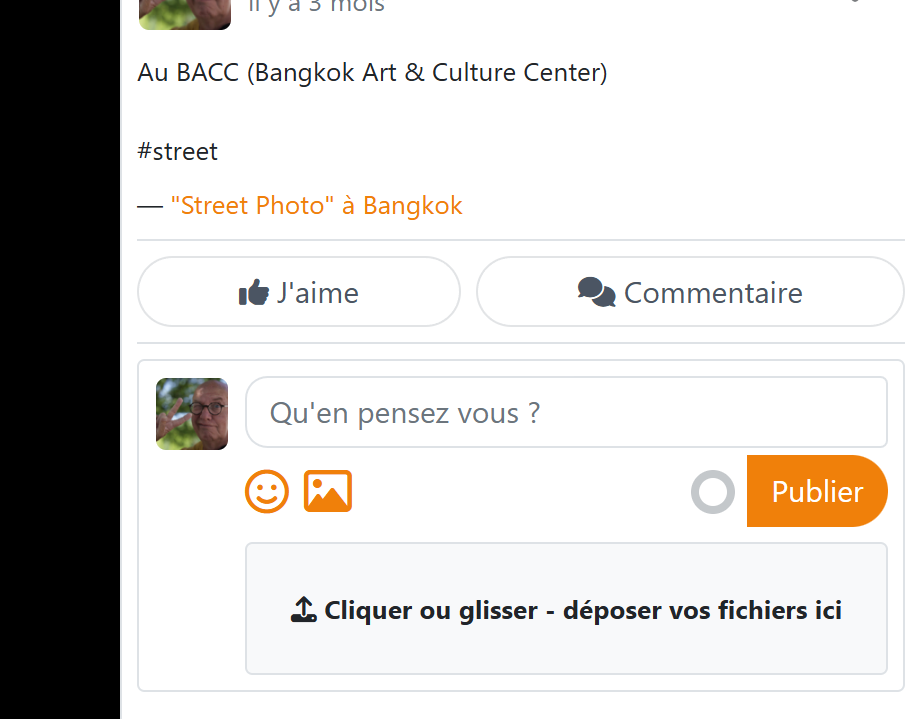
As general behavior expected : t he picture open with the right panel for description and comments - The comment area shows the icon and area to add a picture.(see capture)
 

I tried to figure out the use case :
- My issue occurs ONLY when I click on a photo from activity stream, then if i comment the photo and try to attach a picture in the comment i have the error message at upload.
- If i go to gallery/album where the picture is located ( Profile gallery or Group gallery using menu item or any link available in the activity stream or whatever), i can upload and attach image to the comment, so it's OK

I cannot check on demosite because there is no comment feature on the photos from activity stream
I think my galleries are well configured because it works when i post comment from a gallery
I rolled back my sandbox to former gallery plugin (3.01) and activity stream plugin and i have same issue but did not noticed before 


 
Last edit: 20 hours 21 minutes ago by Toulouzing.

Please Log in or Create an account to join the conversation.

  • krileon
  • krileon
  • ONLINE
  • Posts: 50385
  • Thanks: 8624
  • Karma: 1472
14 hours 9 minutes ago #343845 by krileon
Replied by krileon on topic Invalid media. Please share only !
Ok, was able to confirm. Seams to be an entirely client side validation issue. Probably due to missing gallery client side settings not being loaded. Am investigating further as it could be a CB Activity or CB Gallery bug depending on where it's at. If CB Activity it'll have to wait for CB Activity 7.0.0 which I'm actively working on now, but if it's in CB Gallery will try to have a fixed build out today or tomorrow.


Kyle (Krileon)
Community Builder Team Member
Before posting on forums: Read FAQ thoroughly + Read our Documentation + Search the forums
CB links: Documentation - Localization - CB Quickstart - CB Paid Subscriptions - Add-Ons - Forge
--
If you are a Professional, Developer, or CB Paid Subscriptions subscriber and have a support issue please always post in your respective support forums for best results!
--
If I've missed your support post with a delay of 3 days or greater and are a Professional, Developer, or CBSubs subscriber please send me a private message with your thread and will reply when possible!
--
Please note I am available Monday - Friday from 8:00 AM CST to 4:00 PM CST. I am away on weekends (Saturday and Sunday) and if I've missed your post on or before a weekend after business hours please wait for the next following business day (Monday) and will get to your issue as soon as possible, thank you.
--
My role here is to provide guidance and assistance. I cannot provide custom code for each custom requirement. Please do not inquire me about custom development.

Please Log in or Create an account to join the conversation.

  • krileon
  • krileon
  • ONLINE
  • Posts: 50385
  • Thanks: 8624
  • Karma: 1472
13 hours 34 minutes ago - 13 hours 34 minutes ago #343847 by krileon
Replied by krileon on topic Invalid media. Please share only !
Ok, was able to find the cause. Basically the modal window is creating a situation of there being a gallery (modal window) within a gallery (comment gallery). Am reviewing possible fixes. Looks like it's a fix for CB Gallery though so hopefully can have a fix out today or tomorrow at the latest.

forge.joomlapolis.com/issues/9855


Kyle (Krileon)
Community Builder Team Member
Before posting on forums: Read FAQ thoroughly + Read our Documentation + Search the forums
CB links: Documentation - Localization - CB Quickstart - CB Paid Subscriptions - Add-Ons - Forge
--
If you are a Professional, Developer, or CB Paid Subscriptions subscriber and have a support issue please always post in your respective support forums for best results!
--
If I've missed your support post with a delay of 3 days or greater and are a Professional, Developer, or CBSubs subscriber please send me a private message with your thread and will reply when possible!
--
Please note I am available Monday - Friday from 8:00 AM CST to 4:00 PM CST. I am away on weekends (Saturday and Sunday) and if I've missed your post on or before a weekend after business hours please wait for the next following business day (Monday) and will get to your issue as soon as possible, thank you.
--
My role here is to provide guidance and assistance. I cannot provide custom code for each custom requirement. Please do not inquire me about custom development.
Last edit: 13 hours 34 minutes ago by krileon.

Please Log in or Create an account to join the conversation.

  • krileon
  • krileon
  • ONLINE
  • Posts: 50385
  • Thanks: 8624
  • Karma: 1472
11 hours 29 minutes ago #343850 by krileon
Replied by krileon on topic Invalid media. Please share only !
Ok, this is now fixed in latest CB Gallery build release. It'll more reliably be able to handle nested galleries.


Kyle (Krileon)
Community Builder Team Member
Before posting on forums: Read FAQ thoroughly + Read our Documentation + Search the forums
CB links: Documentation - Localization - CB Quickstart - CB Paid Subscriptions - Add-Ons - Forge
--
If you are a Professional, Developer, or CB Paid Subscriptions subscriber and have a support issue please always post in your respective support forums for best results!
--
If I've missed your support post with a delay of 3 days or greater and are a Professional, Developer, or CBSubs subscriber please send me a private message with your thread and will reply when possible!
--
Please note I am available Monday - Friday from 8:00 AM CST to 4:00 PM CST. I am away on weekends (Saturday and Sunday) and if I've missed your post on or before a weekend after business hours please wait for the next following business day (Monday) and will get to your issue as soon as possible, thank you.
--
My role here is to provide guidance and assistance. I cannot provide custom code for each custom requirement. Please do not inquire me about custom development.
The following user(s) said Thank You: Toulouzing

Please Log in or Create an account to join the conversation.

Moderators: beatnantkrileon
Powered by Kunena Forum