

Skip to Content Skip to Menu

🎃 Happy Halloween! Treat yourself with an awesome discount on memberships! Get 20% off now with code SPOOKY-2026!

CB GroupJive settings

  • Latypov
  • Latypov
  • ONLINE
  • Posts: 28
  • Thanks: 2
  • Karma: 0
10 hours 30 minutes ago - 10 hours 29 minutes ago #344725 by Latypov
CB GroupJive settings was created by Latypov
Hi. I used the EasySocial Pro v4.0.15 component for a long time and considered it very good. But the more I study your component, the more I realize that it’s much better and offers more possibilities for various scenarios. And most importantly, you support it well and make good changes.
I want to offer you an option for changing the Groups.
For users, you’ve implemented the creation of new tabs, which allows you to create different tabs in the profile. But for groups, there’s no way to create new tabs. I found a solution for creating various tabs, but it’s not very convenient. I propose creating settings for tabs that users can change themselves when creating or editing a group in the frontend.
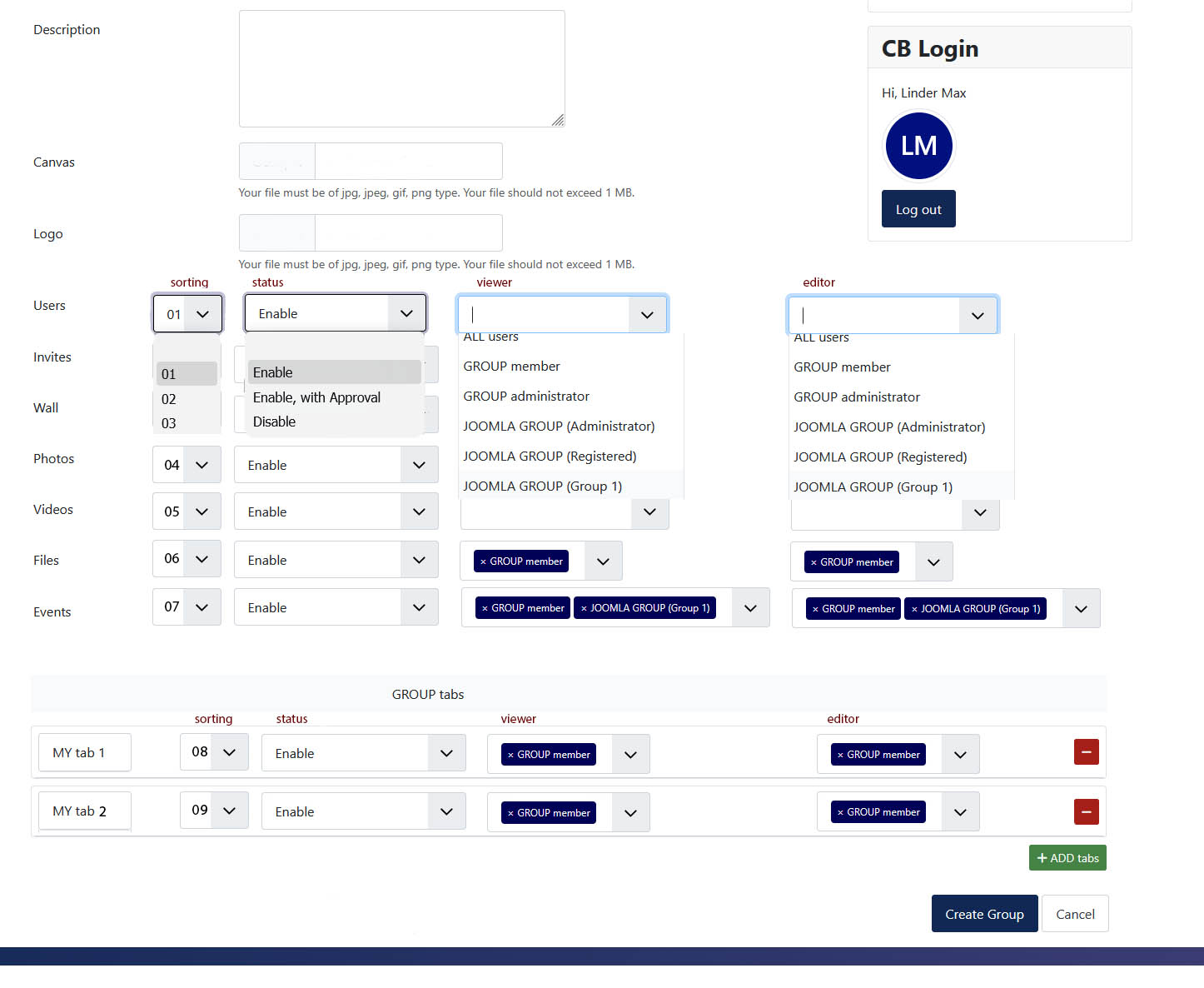
1. Using tab sorting. This setting is available in the backend, but it applies to all tabs.
2. Status in the form of a drop‑down list to save space for the setting (currently this is implemented as buttons)
3. Who can view the group (Select group members, administrators, and moderators. Add Joomla user groups to this list. This will allow you to flexibly customize the group view for certain groups of registered users)
3. Who can add or change the tabs of the group (the settings are the same as for viewing the group)
4. After configuring the built-in plugins, add the ability to create new tabs. Just enter the name of the tab and configure it like the previous built-in plugins. After creation, an empty tab with an editor is created, just like the About plugin. On the tab page, you can click edit and edit tab. It is advisable to use a Joomla editor with buttons for shortcodes so that users can add, for example, Joomla modules. 
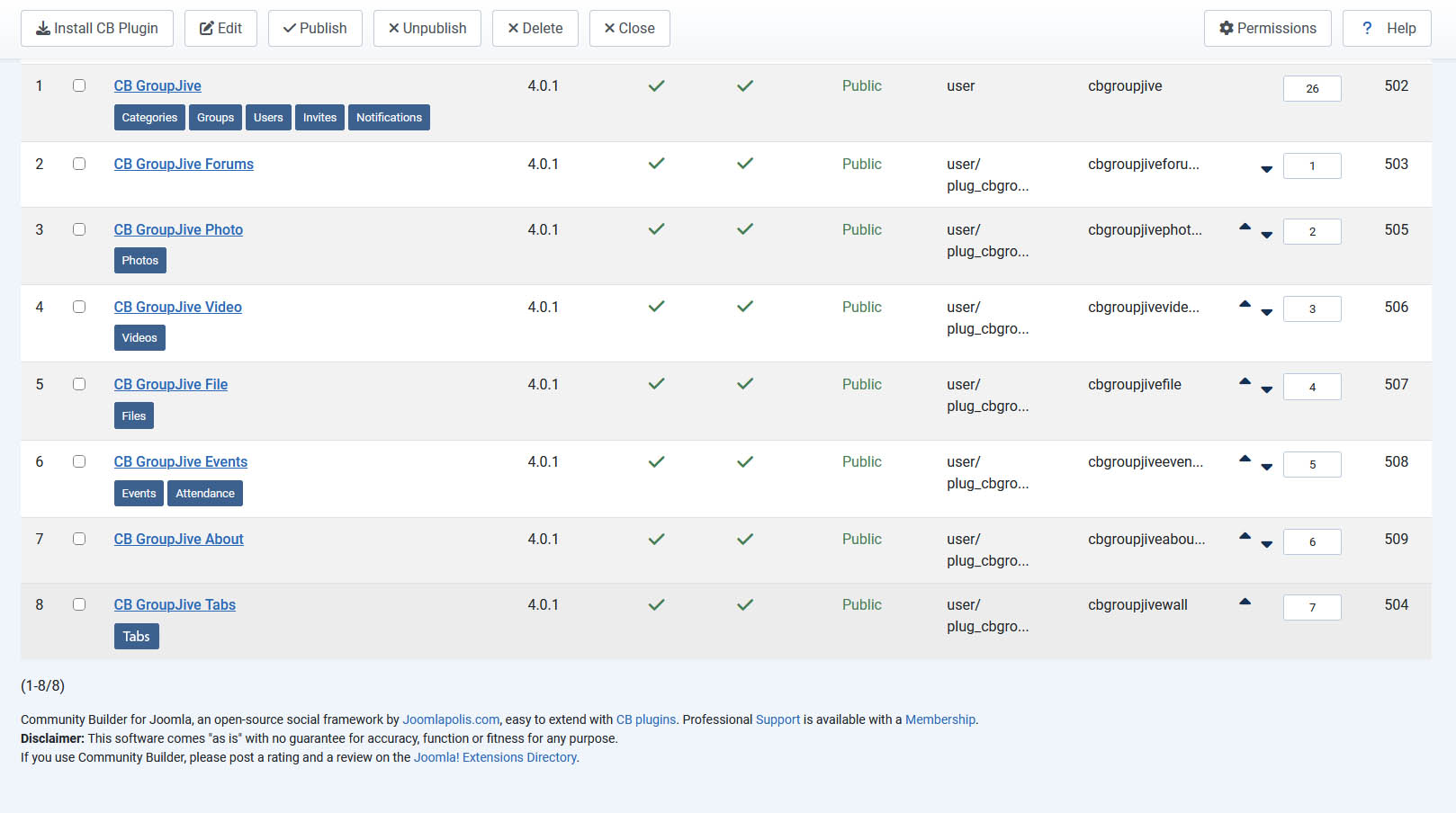
In addition to the plugin settings I made in the screenshot, you need to add an About and an Activity page.
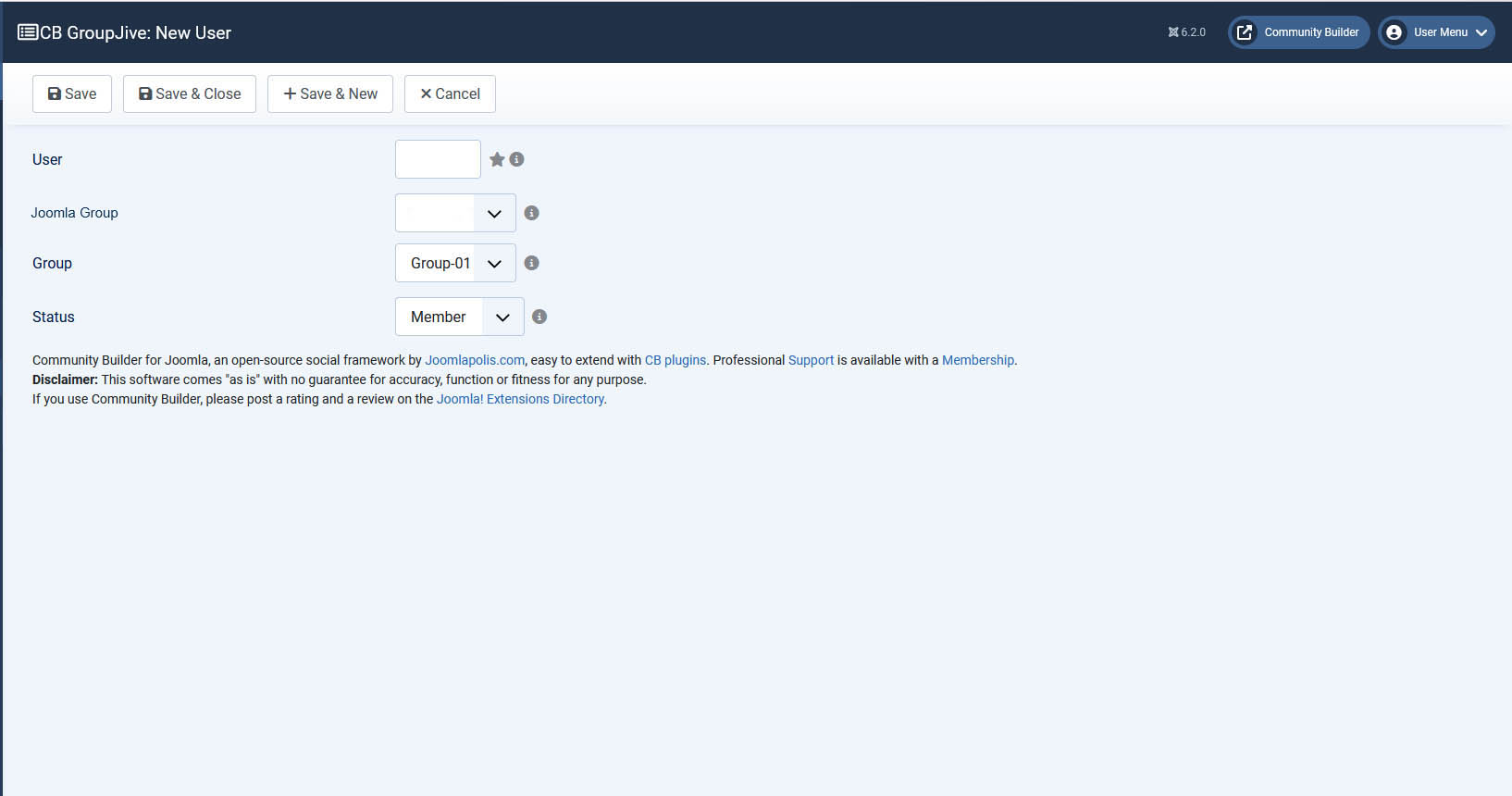
In the backend, add the ability for a group to add not only specific users but also Joomla user groups. And all users who join this Joomla group will automatically become members of this group (CB GroupJive - New User.jpg).
Currently, users can only be added by ID. This is very inconvenient. It could be done as a drop‑down list. It would be better to move these settings to the group settings themselves or duplicate them.
If this is done, users will be able to create pages with their own settings. 
Attachments:
Last edit: 10 hours 29 minutes ago by Latypov.

Please Log in or Create an account to join the conversation.

  • krileon
  • krileon
  • ONLINE
  • Posts: 50795
  • Thanks: 8703
  • Karma: 1475
5 hours 34 minutes ago #344726 by krileon
Replied by krileon on topic CB GroupJive settings
Custom tabs and fields interface will be added when CB GroupJive is converted to a standalone Joomla extension in a future release. When added it'll just be done the same way the User component works in that you'll be able to make Fields and Field Groups. This will bring all the features core Joomla Fields and Field Groups offer as well (e.g. access controls, permissions, etc..).

For now though adding new fields or tabs must be done through API. CB Activity and CB Gallery are already doing this for example. CB Auto Actions is also capable of doing this with no coding necessary. I can provide a CB Auto Actions example if you'd like.

In the backend, add the ability for a group to add not only specific users but also Joomla user groups. And all users who join this Joomla group will automatically become members of this group (CB GroupJive - New User.jpg).

That's doable with CB Auto Actions. There are no plans to pull CB Auto Actions logic out of it and into individual plugins. I can provide an example of how if you'd like.

Currently, users can only be added by ID. This is very inconvenient. It could be done as a drop‑down list. It would be better to move these settings to the group settings themselves or duplicate them.

You can add users to groups from CB > User Management. Simply select who you want to add then click the "Add CB GroupJive Groups" button at the top.


Kyle (Krileon)
Community Builder Team Member
Before posting on forums: Read FAQ thoroughly + Read our Documentation + Search the forums
CB links: Documentation - Localization - CB Quickstart - CB Paid Subscriptions - Add-Ons - Forge
--
If you are a Professional, Developer, or CB Paid Subscriptions subscriber and have a support issue please always post in your respective support forums for best results!
--
If I've missed your support post with a delay of 3 days or greater and are a Professional, Developer, or CBSubs subscriber please send me a private message with your thread and will reply when possible!
--
Please note I am available Monday - Friday from 8:00 AM CST to 4:00 PM CST. I am away on weekends (Saturday and Sunday) and if I've missed your post on or before a weekend after business hours please wait for the next following business day (Monday) and will get to your issue as soon as possible, thank you.
--
My role here is to provide guidance and assistance. I cannot provide custom code for each custom requirement. Please do not inquire me about custom development.

Please Log in or Create an account to join the conversation.
  • Latypov
  • Latypov
  • ONLINE
  • Posts: 28
  • Thanks: 2
  • Karma: 0
5 hours 5 minutes ago #344727 by Latypov
Replied by Latypov on topic CB GroupJive settings
If you make CB GroupJive is converted to a standalone Joomla extension, then it will be a great solution. Yes, I would really like examples of CB Auto Actions for adding tabs and user groups. If you have any more examples of CB Auto Actions, please send them. Or suggest a resource where you can find examples.

Please Log in or Create an account to join the conversation.
  • krileon
  • krileon
  • ONLINE
  • Posts: 50795
  • Thanks: 8703
  • Karma: 1475
3 hours 23 minutes ago #344728 by krileon
Replied by krileon on topic CB GroupJive settings
The below can be used in CB Auto Actions to insert a new tab into groups and display whatever you want it to.

Global
Triggers: gj_onBeforeDisplayGroup
Type: Code
User: Self
Access: Everybody
Action
Method: HTML
Code:
Code:
TAB_HTML_HERE
Output
Display: Return
Layout:
Code:
return [ 'id' => 'TAB_ID_HERE', 'title' => 'TAB_TITLE_HERE', 'content' => $content ];
Method: PHP

Replace TAB_HTML_HERE with the HTML or you could even used PHP with Method set to PHP here that you want to display in the tab. Replace TAB_ID_HERE with the ID of the tab, which is mostly just an internal identifier (e.g. mycustomtab). Replace TAB_TITLE_HERE with the title for the tab, which is actually visible to users (e.g. My Tab).


Kyle (Krileon)
Community Builder Team Member
Before posting on forums: Read FAQ thoroughly + Read our Documentation + Search the forums
CB links: Documentation - Localization - CB Quickstart - CB Paid Subscriptions - Add-Ons - Forge
--
If you are a Professional, Developer, or CB Paid Subscriptions subscriber and have a support issue please always post in your respective support forums for best results!
--
If I've missed your support post with a delay of 3 days or greater and are a Professional, Developer, or CBSubs subscriber please send me a private message with your thread and will reply when possible!
--
Please note I am available Monday - Friday from 8:00 AM CST to 4:00 PM CST. I am away on weekends (Saturday and Sunday) and if I've missed your post on or before a weekend after business hours please wait for the next following business day (Monday) and will get to your issue as soon as possible, thank you.
--
My role here is to provide guidance and assistance. I cannot provide custom code for each custom requirement. Please do not inquire me about custom development.

Please Log in or Create an account to join the conversation.
  • Latypov
  • Latypov
  • ONLINE
  • Posts: 28
  • Thanks: 2
  • Karma: 0
2 hours 59 minutes ago #344729 by Latypov
Replied by Latypov on topic CB GroupJive settings
Thank you. It turned out to be created. And how to make different tabs appear in different groups. And so it turns out that the same tab appears in all groups.

Please Log in or Create an account to join the conversation.

  • krileon
  • krileon
  • ONLINE
  • Posts: 50795
  • Thanks: 8703
  • Karma: 1475
2 hours 52 minutes ago #344730 by krileon
Replied by krileon on topic CB GroupJive settings
You can add conditions to the auto action to restrict it to specific groups or even categories of groups. Examples as follows.

Specific Group
Conditions
Field: Custom > Value
Custom Value: [var1_id]
Operator: Equal To
Value: GROUP_ID_HERE

Replace GROUP_ID_HERE with the ID of the group you want it to display on.

Specific Group Type
Conditions
Field: Custom > Value
Custom Value: [var1_type]
Operator: Equal To
Value: GROUP_TYPE_HERE

Replace GROUP_TYPE_HERE with the integer value of the group type you want it to display in. Group types are as follows.

1 = Open
5 = Invite
2 = Approval
3 = Private
4 = Page

Specific Group Category
Conditions
Field: Custom > Value
Custom Value: [var1_category]
Operator: Equal To
Value: CATEGORY_ID_HERE

Replace CATEGORY_ID_HERE with the ID of the category of groups you want it to display on.

If you're meaning Joomla view access level then simply adjust the Access of the auto action.


Kyle (Krileon)
Community Builder Team Member
Before posting on forums: Read FAQ thoroughly + Read our Documentation + Search the forums
CB links: Documentation - Localization - CB Quickstart - CB Paid Subscriptions - Add-Ons - Forge
--
If you are a Professional, Developer, or CB Paid Subscriptions subscriber and have a support issue please always post in your respective support forums for best results!
--
If I've missed your support post with a delay of 3 days or greater and are a Professional, Developer, or CBSubs subscriber please send me a private message with your thread and will reply when possible!
--
Please note I am available Monday - Friday from 8:00 AM CST to 4:00 PM CST. I am away on weekends (Saturday and Sunday) and if I've missed your post on or before a weekend after business hours please wait for the next following business day (Monday) and will get to your issue as soon as possible, thank you.
--
My role here is to provide guidance and assistance. I cannot provide custom code for each custom requirement. Please do not inquire me about custom development.

Please Log in or Create an account to join the conversation.

Moderators: beat, nant, krileon
Powered by Kunena Forum

