

Skip to Content Skip to Menu

Handling "A La Carte" Plan Upgrades/Changes with CBSubs Options & Family Plans

2 days 9 hours ago #343493 by okp-medezide
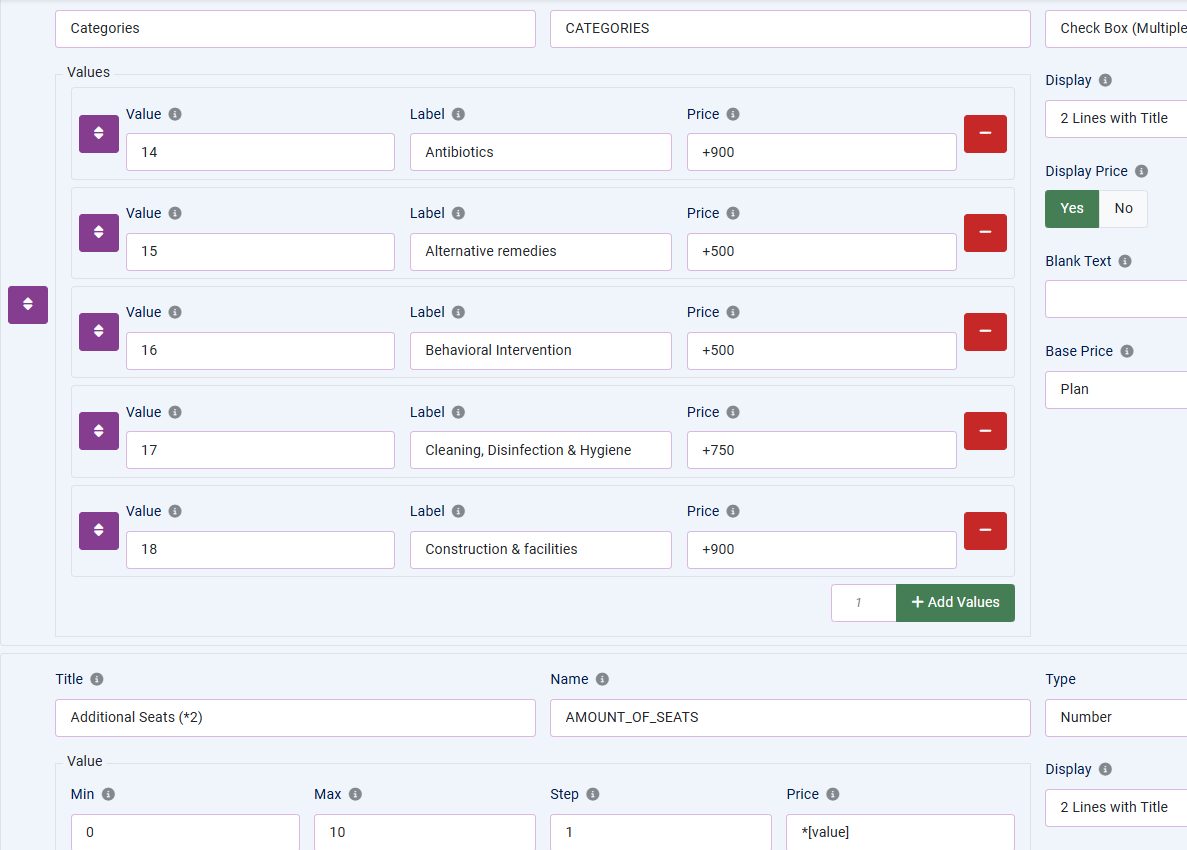
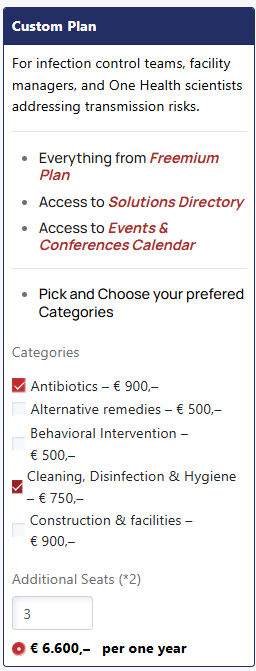
Hi everyone,We are building a sophisticated B2B subscription model using CBSubs Options, CBSubs Family Plans, and CBSubs CB Fields. While the initial registration works, we are hitting a wall regarding how to handle mid-term changes (upgrades/downgrades) to our "A La Carte" plan.Our Current Setup:We have a single "Custom Plan" where the price is driven entirely by user selection:
  • Duration & Renewal: We currently exclusively offer 1-year memberships. The plan is configured to allow renewals 30 days before expiration.
  • Dynamic Categories: Users select multiple categories via checkboxes. These are mapped to a custom field
    Code:
    cb_category_access
    using CBSubs CB Fields. We use this field for custom ACL overrides to show/hide content.
  • Additional Licenses (B2B): Users select a number of additional seats. This integer is pushed to custom field 
    Code:
    cb_amountofadditionallicenses
    , which powers CBSubs Family Plans to allow the buyer to manage B2B license-sharing.
  • Pricing: The base plan is 0€, and all value is added via the checkboxes (fixed costs) and the seat counter (multiplicative:
    Code:
    *[value]
    ).
The Challenge: Mid-Term Option ChangesWe want users to be able to log in to "My Account" at any point during their year-long subscription and add/remove categories or seats. We are currently facing a "catch-22" with the CBSubs Options display settings:
  • Scenario A: If we set "Require Options Change Renewal" to Yes, the "Change Options" button disappears from the user's active subscription view unless they are within that 30-day renewal window. This forces them to wait until the end of the year to make any changes.
  • Scenario B: If we set it to No, the user can change their options mid-term, but the system does not trigger a payment for the added features. It simply updates the database/user fields, effectively giving them the extra categories/seats for free for the remainder of the term.
What we need to achieve:We need a way for the user to "upgrade" their existing subscription to the same plan ID but with new options selected. Ideally, the system should:
  1. Calculate the price difference between the current selection and the new selection.
  2. Apply pro-rating based on the remaining time in the current 1-year cycle.
  3. Generate an invoice for the difference without creating a duplicate subscription or extending the expiration date (unless they are in the renewal window).
We plan to expand into Monthly and Quarterly options soon, so a scalable solution is vital.Our Questions:
  1. Is there a specific configuration in the Pricing or Workflows tabs that allows a "Self-Upgrade" (Upgrading to the same plan with different options) to trigger a pro-rated invoice mid-term?
  2. We considered "Campaign Codes" as a manual workaround for re-subscriptions, but this is not sustainable for a self-service UX.
  3. Is our "All-in-one" plan approach the best way to handle an "A La Carte" model, or is there a better architectural pattern in CBSubs for this?
We would appreciate any advice or suggestions for building the custom plan / A la carte option, as it has been a big challenge.
Attachments:

Please Log in or Create an account to join the conversation.

  • krileon
  • krileon
  • ONLINE
  • Posts: 50241
  • Thanks: 8598
  • Karma: 1470
2 days 4 hours ago #343496 by krileon
There is currently no way to do a mid-term options change without doing a renewal or first cancelling then resubscribing. There are plans to eventually allow for a partial payment to upgrade to the new options selection, but that's not available yet. The feature to change options without a renewal simply changes the options then will apply those options at next renewal, but in the future that will be the partial payment feature.

The only way I can think of to escape this requirement is basically break your options out into a dozen different plans so they can mix and match them as they please whenever they please, but that brings a set of its own potential usability issues. Additional seats for example would need to stop being a free standing integer and instead be static amounts.


Kyle (Krileon)
Community Builder Team Member
Before posting on forums: Read FAQ thoroughly + Read our Documentation + Search the forums
CB links: Documentation - Localization - CB Quickstart - CB Paid Subscriptions - Add-Ons - Forge
--
If you are a Professional, Developer, or CB Paid Subscriptions subscriber and have a support issue please always post in your respective support forums for best results!
--
If I've missed your support post with a delay of 3 days or greater and are a Professional, Developer, or CBSubs subscriber please send me a private message with your thread and will reply when possible!
--
Please note I am available Monday - Friday from 8:00 AM CST to 4:00 PM CST. I am away on weekends (Saturday and Sunday) and if I've missed your post on or before a weekend after business hours please wait for the next following business day (Monday) and will get to your issue as soon as possible, thank you.
--
My role here is to provide guidance and assistance. I cannot provide custom code for each custom requirement. Please do not inquire me about custom development.

Please Log in or Create an account to join the conversation.
1 day 9 hours ago - 1 day 9 hours ago #343500 by okp-medezide
Thanks for the quick response and the clarification

For our launch, I think we have to go with a 'Contact Support' workflow for mid-term changes. We can then manually provide the customer with a personalized promotional code that subtracts their pro-rated credit, allowing them to effectively re-subscribe with their new selections at the correct price. This should be manageable while we grow, and we’ll definitely be looking forward to that 'partial payment' feature as we scale.

Regarding the suggestion to break options into separate plans: we actually experimented with creating unique plans for each category as children to the 'Custom Plan.' However, we ran into significant complications with CBSubs Family Plans. Sharing the parent plan didn't seem to automatically include the child plans for the sub-accounts, which made the management flow for the B2B buyer very confusing.Keeping everything in one plan via CBSubs Options is much cleaner for the Family Plan sharing logic, so we’ll stick with this and the manual coupon workaround for now. Thanks again for the help!

 One follow-up question regarding the "A La Carte" setup: As mentioned, I am currently using CBSubs CB Fields to map the options selection to a custom field (
Code:
cb_category_access
). However, I am wondering if it is possible to instead assign the user to specific Joomla usergroups dynamically based on their options selection? I didn't see an option to choose usergroups when setting up the CBSubs CB Fields integration.

Is there a recommended way to achieve dynamic usergroup assignment based on the specific options a user has selected within a single plan?"
Last edit: 1 day 9 hours ago by okp-medezide.

Please Log in or Create an account to join the conversation.
  • krileon
  • krileon
  • ONLINE
  • Posts: 50241
  • Thanks: 8598
  • Karma: 1470
1 day 5 hours ago #343501 by krileon
Using a single plan when it comes to family share is indeed the cleanest option. I've already got a feature ticket to allow plan option changes and do partial billing, but it requires a much more complex and larger feature to be added to CBSubs first to basically support custom baskets with custom line items not attached to a plan.

forge.joomlapolis.com/issues/9531
forge.joomlapolis.com/issues/9827

I don't have a time frame for when either will be implemented, sorry. I will be taking a look after this CB Gallery release I'm working on is finished and maybe it's not as complex as I'm expecting.

However, I am wondering if it is possible to instead assign the user to specific Joomla usergroups dynamically based on their options selection? I didn't see an option to choose usergroups when setting up the CBSubs CB Fields integration.

CBSubs doesn't have a built in option for that as it just provides support for adding a usergroup with the subscription only. You can either use CBSubs SQL Actions and just insert a database row into the _user_usergroup_map table for the usergroup you want to give them or use CB Auto Actions and its Usergroup action. I can provide examples for either based off which you'd prefer to use.


Kyle (Krileon)
Community Builder Team Member
Before posting on forums: Read FAQ thoroughly + Read our Documentation + Search the forums
CB links: Documentation - Localization - CB Quickstart - CB Paid Subscriptions - Add-Ons - Forge
--
If you are a Professional, Developer, or CB Paid Subscriptions subscriber and have a support issue please always post in your respective support forums for best results!
--
If I've missed your support post with a delay of 3 days or greater and are a Professional, Developer, or CBSubs subscriber please send me a private message with your thread and will reply when possible!
--
Please note I am available Monday - Friday from 8:00 AM CST to 4:00 PM CST. I am away on weekends (Saturday and Sunday) and if I've missed your post on or before a weekend after business hours please wait for the next following business day (Monday) and will get to your issue as soon as possible, thank you.
--
My role here is to provide guidance and assistance. I cannot provide custom code for each custom requirement. Please do not inquire me about custom development.

Please Log in or Create an account to join the conversation.

1 day 4 hours ago - 1 day 4 hours ago #343502 by okp-medezide
Thanks for the suggestion! I think CB Auto Actions is definitely the way to go.

I’ve actually already written some ACL code in my custom overrides that utilizes Joomla Usergroups, so being able to map these selections to groups would be ideal. I am currently mapping the selections to a custom field (
Code:
cb_category_access
), and I'm thinking I could use that field as the 'Trigger' or 'Condition' for the Auto Action.

Could you provide an example of the best way to set this up? Specifically:
The Trigger: Should I use a CBSubs-specific trigger to check the value of my
Code:
cb_category_access
field? or do we need to trigger by subscriptions/renewals/upgrades, etc.
Action Type: How do we use the selected options or the custom field checkboxes and convert that to the respective User groups?
Last edit: 1 day 4 hours ago by okp-medezide.

Please Log in or Create an account to join the conversation.

  • krileon
  • krileon
  • ONLINE
  • Posts: 50241
  • Thanks: 8598
  • Karma: 1470
1 day 4 hours ago #343503 by krileon
The below should work then. Since the option was pushed to a field that'll be the easiest way to condition against the selection.

Plan Active
Global
Triggers: onCPayUserStateChange
Type: Usergroups
User: Automatic
Access: Everybody
Conditions
Condition 1
Field: cb_category_access
Operator: Equal To
Value: OPTION_VALUE_HERE
Condition 2
Field: Custom > Value
Custom Value: [var3]
Operator: Equal To
Value: PLAN_ID_HERE
Condition 3
Field: Custom > Value
Custom Value: [var2]
Operator: Equal To
Value: A
Action
Mode: Add Usergroups
Groups: SELECT_USERGROUPS_HERE
Parameters
Reload User: Yes

Replace OPTION_VALUE_HERE with whatever your option value. Replace PLAN_ID_HERE with whatever the plan id is. For SELECT_USERGROUPS_HERE select whatever usergroups that option should give. You can also remove usergroups added by other options here as well.

You'll need 1 auto action per cb_category_access value so that you can uniquely add your usergroups per option value.

Plan Expired
Global
Triggers: onCPayUserStateChange
Type: Usergroups
User: Automatic
Access: Everybody
Conditions
Condition 1
Field: Custom > Value
Custom Value: [var3]
Operator: Equal To
Value: PLAN_ID_HERE
Condition 2
Field: Custom > Value
Custom Value: [var2]
Operator: Not Equal To
Value: A
Action
Mode: Remove Usergroups
Groups: SELECT_USERGROUPS_HERE

As like before set PLAN_ID_HERE to your plan id and then for SELECT_USERGROUPS_HERE select all the usergroups added by your options so that they get cleared if their plan expires. You don't need multiple of these for the different cb_category_access options. This single auto action should be responsible for clearing their usergroups.


Kyle (Krileon)
Community Builder Team Member
Before posting on forums: Read FAQ thoroughly + Read our Documentation + Search the forums
CB links: Documentation - Localization - CB Quickstart - CB Paid Subscriptions - Add-Ons - Forge
--
If you are a Professional, Developer, or CB Paid Subscriptions subscriber and have a support issue please always post in your respective support forums for best results!
--
If I've missed your support post with a delay of 3 days or greater and are a Professional, Developer, or CBSubs subscriber please send me a private message with your thread and will reply when possible!
--
Please note I am available Monday - Friday from 8:00 AM CST to 4:00 PM CST. I am away on weekends (Saturday and Sunday) and if I've missed your post on or before a weekend after business hours please wait for the next following business day (Monday) and will get to your issue as soon as possible, thank you.
--
My role here is to provide guidance and assistance. I cannot provide custom code for each custom requirement. Please do not inquire me about custom development.

Please Log in or Create an account to join the conversation.

Moderators: beatnantkrileon
Powered by Kunena Forum

