
Skip to Content Skip to Menu

[#5600] use the Request Connection Javascript link for other uses

10 years 10 months ago - 10 years 10 months ago #272980 by pranaydhruv
Hello Kyle,
I updated the Auto actions plugin to the latest release and also the conditionals to the latest. and created an Autoaction for Private message , it created a URL as follows :-

http://localhost/index.php?option=com_comprofiler&view=pluginclass&plugin=cbautoactions&action=action&actions=59&Itemid=488&&users=[user_id]

when i use this URL in custom HTML it doesn't send a PM to the user whose profile is being visited, but when i use the URL to send a message to the user's own profile that works.

so the URL works but only to send a self message.

Thanks
Pranay
Last edit: 10 years 10 months ago by pranaydhruv.

Please Log in or Create an account to join the conversation.

  • krileon
  • krileon
  • ONLINE
  • Posts: 50732
  • Thanks: 8695
  • Karma: 1475
10 years 10 months ago #273003 by krileon
Please ensure your PM action is configured as exampled in my reply below.

www.joomlapolis.com/forum/255-developer-members-support/231695-use-the-request-connection-javascript-link-for-other-uses?limitstart=0#272910

The From needs to be of the viewing user while the To would be of the trigger user. Ensure the &users= is replacing as expected in your Custom HTML field. It should have the user id of the displayed user.


Kyle (Krileon)
Community Builder Team Member
Before posting on forums: Read FAQ thoroughly + Read our Documentation + Search the forums
CB links: Documentation - Localization - CB Quickstart - CB Paid Subscriptions - Add-Ons - Forge
--
If you are a Professional, Developer, or CB Paid Subscriptions subscriber and have a support issue please always post in your respective support forums for best results!
--
If I've missed your support post with a delay of 3 days or greater and are a Professional, Developer, or CBSubs subscriber please send me a private message with your thread and will reply when possible!
--
Please note I am available Monday - Friday from 8:00 AM CST to 4:00 PM CST. I am away on weekends (Saturday and Sunday) and if I've missed your post on or before a weekend after business hours please wait for the next following business day (Monday) and will get to your issue as soon as possible, thank you.
--
My role here is to provide guidance and assistance. I cannot provide custom code for each custom requirement. Please do not inquire me about custom development.

Please Log in or Create an account to join the conversation.
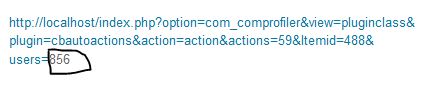
10 years 10 months ago - 10 years 10 months ago #273074 by pranaydhruv
Hello Kyle,

I followed your instructions word to word. and in Customer HTML field when i put in that URL and add &users=[user_id] part in the end, and go to some other user's profile i do see their id at the end of the URL, but it is not part of the URL somehow, because when i hover over the link that id does not change color. and when i click the link a message is sent to my own profile instead of that user. Also when i go to that link and type in that users id at the end of the link manually in the browser and refresh, that user gets a message from their own profile.


Thanks
Pranay
Attachments:
Last edit: 10 years 10 months ago by pranaydhruv.

Please Log in or Create an account to join the conversation.

  • krileon
  • krileon
  • ONLINE
  • Posts: 50732
  • Thanks: 8695
  • Karma: 1475
10 years 10 months ago #273104 by krileon
Please provide the exact contents of your Custom HTML field in a forum code tag.


Kyle (Krileon)
Community Builder Team Member
Before posting on forums: Read FAQ thoroughly + Read our Documentation + Search the forums
CB links: Documentation - Localization - CB Quickstart - CB Paid Subscriptions - Add-Ons - Forge
--
If you are a Professional, Developer, or CB Paid Subscriptions subscriber and have a support issue please always post in your respective support forums for best results!
--
If I've missed your support post with a delay of 3 days or greater and are a Professional, Developer, or CBSubs subscriber please send me a private message with your thread and will reply when possible!
--
Please note I am available Monday - Friday from 8:00 AM CST to 4:00 PM CST. I am away on weekends (Saturday and Sunday) and if I've missed your post on or before a weekend after business hours please wait for the next following business day (Monday) and will get to your issue as soon as possible, thank you.
--
My role here is to provide guidance and assistance. I cannot provide custom code for each custom requirement. Please do not inquire me about custom development.

Please Log in or Create an account to join the conversation.

10 years 10 months ago #273137 by pranaydhruv
<address><a href="index.php?option=com_comprofiler&amp;view=pluginclass&amp;plugin=cbautoactions&amp;action=action&amp;actions=59&amp;Itemid=488&amp;users=">http://localhost/index.php?option=com_comprofiler&amp;view=pluginclass&amp;plugin=cbautoactions&amp;action=action&amp;actions=59&amp;Itemid=488&amp;users=[user_id]</address>

Please Log in or Create an account to join the conversation.

  • krileon
  • krileon
  • ONLINE
  • Posts: 50732
  • Thanks: 8695
  • Karma: 1475
10 years 10 months ago - 10 years 10 months ago #273146 by krileon
Your substitution is outside the href. Try the below.

Code:
<a href="index.php?option=com_comprofiler&view=pluginclass&plugin=cbautoactions&action=action&actions=59&Itemid=488&users=[user_id]">PM</a>


Kyle (Krileon)
Community Builder Team Member
Before posting on forums: Read FAQ thoroughly + Read our Documentation + Search the forums
CB links: Documentation - Localization - CB Quickstart - CB Paid Subscriptions - Add-Ons - Forge
--
If you are a Professional, Developer, or CB Paid Subscriptions subscriber and have a support issue please always post in your respective support forums for best results!
--
If I've missed your support post with a delay of 3 days or greater and are a Professional, Developer, or CBSubs subscriber please send me a private message with your thread and will reply when possible!
--
Please note I am available Monday - Friday from 8:00 AM CST to 4:00 PM CST. I am away on weekends (Saturday and Sunday) and if I've missed your post on or before a weekend after business hours please wait for the next following business day (Monday) and will get to your issue as soon as possible, thank you.
--
My role here is to provide guidance and assistance. I cannot provide custom code for each custom requirement. Please do not inquire me about custom development.
Last edit: 10 years 10 months ago by krileon.

Please Log in or Create an account to join the conversation.

Moderators: beat, nant, krileon
Powered by Kunena Forum

