

Skip to Content Skip to Menu

How to display the photos to be approved as images an not as a list

1 day 8 hours ago - 1 day 8 hours ago #343240 by erichburkhard
My current setting:
Joomla: 5.4.1
CB: 2.11.0+build.2026.01.12.21.55.56.a25ef0f6c
CB Gallery: 3.0.1+build.2026.01.22.15.13.24.b8e3d0daf 

Current situation:
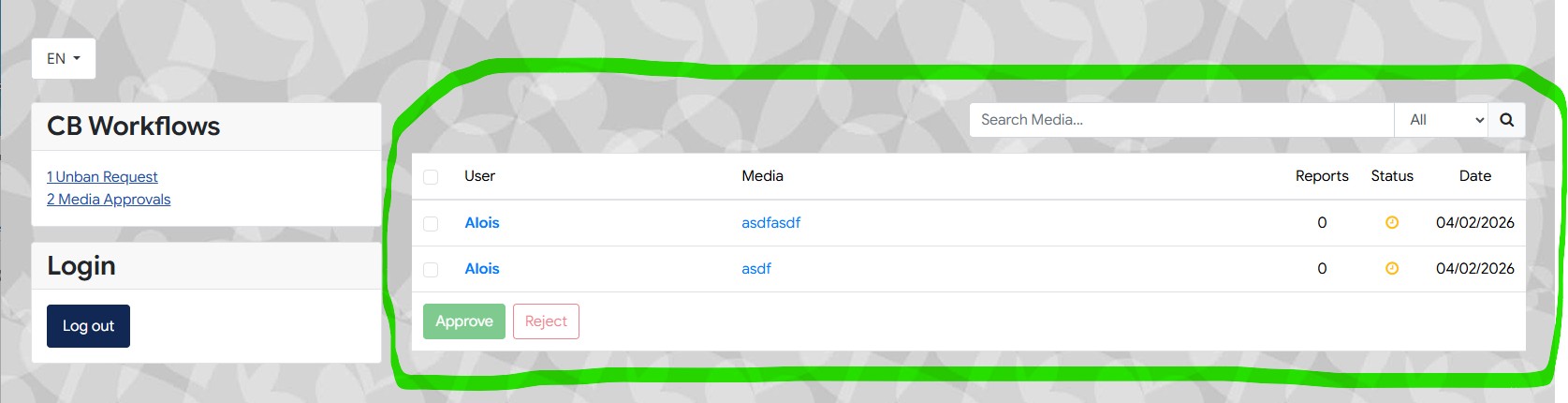
If as moderator logs into the webpage in order to approve the uploaded gallery images of users the corresponding gallery images (to be approved) will be presented as a list which looks as follows:


Question:
Is it possible to display the images not as a link but as a thumbnail? Because otherwise the moderator alsways has to click first onto the link in order to see the image. I have tried to find some 'switches' in the backend but I was not successful

thank for help
Last edit: 1 day 8 hours ago by erichburkhard.

Please Log in or Create an account to join the conversation.

  • krileon
  • krileon
  • ONLINE
  • Posts: 50137
  • Thanks: 8577
  • Karma: 1468
1 day 7 hours ago #343241 by krileon
It's a modal window so you can see the actual full image and the media uploaded may not even be an image as it could be a file, a video, etc.. I don't see how to possibly fit that nicely in a table. Maybe some kind of hover preview? Mouseover it and it shows the thumbnail image? Would that be sufficient?

Note the entire table is a template file in CB Gallery so it can be entirely replaced with your own HTML if you wanted.


Kyle (Krileon)
Community Builder Team Member
Before posting on forums: Read FAQ thoroughly + Read our Documentation + Search the forums
CB links: Documentation - Localization - CB Quickstart - CB Paid Subscriptions - Add-Ons - Forge
--
If you are a Professional, Developer, or CB Paid Subscriptions subscriber and have a support issue please always post in your respective support forums for best results!
--
If I've missed your support post with a delay of 3 days or greater and are a Professional, Developer, or CBSubs subscriber please send me a private message with your thread and will reply when possible!
--
Please note I am available Monday - Friday from 8:00 AM CST to 4:00 PM CST. I am away on weekends (Saturday and Sunday) and if I've missed your post on or before a weekend after business hours please wait for the next following business day (Monday) and will get to your issue as soon as possible, thank you.
--
My role here is to provide guidance and assistance. I cannot provide custom code for each custom requirement. Please do not inquire me about custom development.

Please Log in or Create an account to join the conversation.

9 hours 42 minutes ago - 9 hours 39 minutes ago #343249 by erichburkhard
Thanks for your answer. Now I understand the ‘problem’. Based on your reply I made some thoughts / brainstroming:
So the main goal of this table is to effectively present the files (type = video / document / images / etc.) to be approved  by the moderator. And based on the displayed information about each file the moderator should be enabled to decide very fast!!! which file should be approved or not approved.

It is obvious that a thumbnail could accelerate this decision in case of type = image. But if the file type is e.g. a video-file the only way to check is to click on the corresponding link an look the whole video.As a conclusion of these requirements a possible solution could look as follows:

There will be implemented an additional ‘Media Detail’ switch (in the frontend). As soon as this switch has been activated the ‘Media’ column shows more detailed information about the corresponding file. E.g. if the file is of type = image, the detail could e.g. show the thumbnail of this image. If the file is of type = video, the detail could e.g. show the filesize / length of the video (which could also be a criateria for the approval decision)

Example scenario:
Let’s assume that this table shows 2000 entries. Half of them are image files and half of them are video files. As a first step the moderator could filter all the image files (the filter dropdown already exists) and activate the ‘Media Detail’ Switch. Now the thumbnails become visible and the moderator is able to approve all these files at a glance. After this step the moderator filters all video files …. Of course now he has to click on each file in order to view it.

Anyway. At the moment I have not 2000 files 😊 So I can live with the current implementation. May be you can discuss my idea in your developer community.
Last edit: 9 hours 39 minutes ago by erichburkhard.

Please Log in or Create an account to join the conversation.

  • krileon
  • krileon
  • ONLINE
  • Posts: 50137
  • Thanks: 8577
  • Karma: 1468
6 hours 16 minutes ago #343251 by krileon
I suppose it just kind of depends on if that information is actually relevant to the approval. Validation rules themselves prevent sharing media that isn't permitted as is. So what exactly are you looking for when you're approving the media?

The only at-a-glance I can suggest is just hover previews, which I've added a feature ticket for.

forge.joomlapolis.com/issues/9815


Kyle (Krileon)
Community Builder Team Member
Before posting on forums: Read FAQ thoroughly + Read our Documentation + Search the forums
CB links: Documentation - Localization - CB Quickstart - CB Paid Subscriptions - Add-Ons - Forge
--
If you are a Professional, Developer, or CB Paid Subscriptions subscriber and have a support issue please always post in your respective support forums for best results!
--
If I've missed your support post with a delay of 3 days or greater and are a Professional, Developer, or CBSubs subscriber please send me a private message with your thread and will reply when possible!
--
Please note I am available Monday - Friday from 8:00 AM CST to 4:00 PM CST. I am away on weekends (Saturday and Sunday) and if I've missed your post on or before a weekend after business hours please wait for the next following business day (Monday) and will get to your issue as soon as possible, thank you.
--
My role here is to provide guidance and assistance. I cannot provide custom code for each custom requirement. Please do not inquire me about custom development.

Please Log in or Create an account to join the conversation.

5 hours 18 minutes ago #343255 by erichburkhard
... I just verify that the uploaded image looks 'serious' because my business is a dating plattform .... but hover preview is fine for me. THANKS

Please Log in or Create an account to join the conversation.

  • krileon
  • krileon
  • ONLINE
  • Posts: 50137
  • Thanks: 8577
  • Karma: 1468
4 hours 48 minutes ago #343258 by krileon
Will also see if I can improve the modal window for the approval page as well. It should have a lot more information and it'd be nice to be able to approve/reject directly from the modal window.


Kyle (Krileon)
Community Builder Team Member
Before posting on forums: Read FAQ thoroughly + Read our Documentation + Search the forums
CB links: Documentation - Localization - CB Quickstart - CB Paid Subscriptions - Add-Ons - Forge
--
If you are a Professional, Developer, or CB Paid Subscriptions subscriber and have a support issue please always post in your respective support forums for best results!
--
If I've missed your support post with a delay of 3 days or greater and are a Professional, Developer, or CBSubs subscriber please send me a private message with your thread and will reply when possible!
--
Please note I am available Monday - Friday from 8:00 AM CST to 4:00 PM CST. I am away on weekends (Saturday and Sunday) and if I've missed your post on or before a weekend after business hours please wait for the next following business day (Monday) and will get to your issue as soon as possible, thank you.
--
My role here is to provide guidance and assistance. I cannot provide custom code for each custom requirement. Please do not inquire me about custom development.

Please Log in or Create an account to join the conversation.

Moderators: beatnantkrileon
Powered by Kunena Forum

