Skip to Content Skip to Menu

Test Clock Id Field Does Not Show

2 days 9 hours ago #343546 by STUCKSHUTTER
Test Clock Id Field Does Not Show was created by STUCKSHUTTER
We are running the following software online: Joomla 6.0.2, Community Builder 2.11.0, and CBSubs 4.9.0.We need to test our payment plan as they have two different discounts applied so the first and second months charge a discounted rate and hit a snag trying to test the monthly steps using Stripe and its Sandbox. Everything works, accounts are created in CBSubs, etc. The issue we are stuck on is getting the Test Clock ID field to display so we can successfully test our payment setup.We have exhaustively worked with Gemini to try and get the Test Clock ID field to display but cannot, we have spent at least 6 or 8 hours trying many approaches so I hope you can resolve this for us. We have set the Gateway panel fields as follows:Stripe server: Stripe test serverTest Clocks: YESStripe account key: pk_test_ etcStripe account Secret key: sk_test_ etcStripe Webhook Credentials: Set and accepted.Events to listen to: 11 events selectedStripe webhook signing secret: setVisible for Access levels: PublicThank you in advance for any help you can provide.

Please Log in or Create an account to join the conversation.

  • krileon
  • krileon
  • ONLINE
  • Posts: 50264
  • Thanks: 8601
  • Karma: 1470
1 day 10 hours ago #343551 by krileon
Replied by krileon on topic Test Clock Id Field Does Not Show
You don't set the test clock id. You simply toggle on test clocks. Edit your Stripe gateway then set "Stripe server" to "Stripe test server" and "Test Clocks" to "Yes". Now you can fully test the entire payment flow. Recurring subscriptions will use test clocks for their entire flow. Within your Stripe account you can advance that test clocks time.


Kyle (Krileon)
Community Builder Team Member
Before posting on forums: Read FAQ thoroughly + Read our Documentation + Search the forums
CB links: Documentation - Localization - CB Quickstart - CB Paid Subscriptions - Add-Ons - Forge
--
If you are a Professional, Developer, or CB Paid Subscriptions subscriber and have a support issue please always post in your respective support forums for best results!
--
If I've missed your support post with a delay of 3 days or greater and are a Professional, Developer, or CBSubs subscriber please send me a private message with your thread and will reply when possible!
--
Please note I am available Monday - Friday from 8:00 AM CST to 4:00 PM CST. I am away on weekends (Saturday and Sunday) and if I've missed your post on or before a weekend after business hours please wait for the next following business day (Monday) and will get to your issue as soon as possible, thank you.
--
My role here is to provide guidance and assistance. I cannot provide custom code for each custom requirement. Please do not inquire me about custom development.

Please Log in or Create an account to join the conversation.

1 day 2 hours ago #343554 by STUCKSHUTTER
Replied by STUCKSHUTTER on topic Test Clock Id Field Does Not Show
Thank you for the help, that resolved that. However, now I get the message in Notifications that the transaction "No PDT and no IPN, but free first period" with the status "SIMULATEDOK".  This means the transaction does not reach Stripe I believe so it does not show up there.

The plan settings for Local Service:
Pricing and validity settings:

Is the first amount and period different - Always same period and price
 
Regular Plan pricing and validity
Regular Price of plan - 69.00000
 
Regular Validity duration - 1 month
 
Total number of occurrences of regular validity/price (0=unlimitted)- 0

I am hoping you can clarify what is causing the problem.  There are no Integrations / Options. That is set to Disabled and the fields are blank. There are also no workflows.
Thanking you in advance for your spot on help.
Chris Dekle

Please Log in or Create an account to join the conversation.

  • krileon
  • krileon
  • ONLINE
  • Posts: 50264
  • Thanks: 8601
  • Karma: 1470
11 hours 38 minutes ago #343555 by krileon
Replied by krileon on topic Test Clock Id Field Does Not Show
You need to have a full sandbox account setup and to use the sandbox account while testing. It won't send test payments to a live account as Stripe does not permit that.


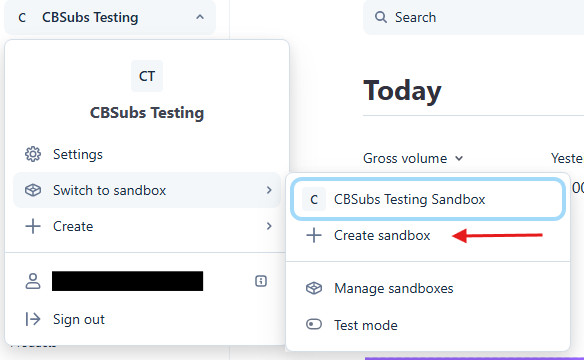
Top left you should have a menu like that. Notice my sandbox account? You'll need to create one as well. Then switch your API credentials, etc.. within your Stripe gateway to it. This allows you to do full testing. The documentation for this is below if you need further information. Including information on how to test (e.g. test credit cards).

docs.stripe.com/sandboxes


Kyle (Krileon)
Community Builder Team Member
Before posting on forums: Read FAQ thoroughly + Read our Documentation + Search the forums
CB links: Documentation - Localization - CB Quickstart - CB Paid Subscriptions - Add-Ons - Forge
--
If you are a Professional, Developer, or CB Paid Subscriptions subscriber and have a support issue please always post in your respective support forums for best results!
--
If I've missed your support post with a delay of 3 days or greater and are a Professional, Developer, or CBSubs subscriber please send me a private message with your thread and will reply when possible!
--
Please note I am available Monday - Friday from 8:00 AM CST to 4:00 PM CST. I am away on weekends (Saturday and Sunday) and if I've missed your post on or before a weekend after business hours please wait for the next following business day (Monday) and will get to your issue as soon as possible, thank you.
--
My role here is to provide guidance and assistance. I cannot provide custom code for each custom requirement. Please do not inquire me about custom development.

Please Log in or Create an account to join the conversation.

8 hours 42 minutes ago #343557 by STUCKSHUTTER
Replied by STUCKSHUTTER on topic Test Clock Id Field Does Not Show
Hi Krileon,
Thank you for the information. We do have the sandbox setup and functioning, but before we could test, we tried to open "Settings" and received the following error, which reoccurred after we logged out of our website and then reloaded it.  The error is: "An error has occurred. • Call to undefined function exec().
How can we resolve this?
Thank you in advance for your help.


Please Log in or Create an account to join the conversation.

  • krileon
  • krileon
  • ONLINE
  • Posts: 50264
  • Thanks: 8601
  • Karma: 1470
8 hours 18 minutes ago #343559 by krileon
Replied by krileon on topic Test Clock Id Field Does Not Show
Enable debug mode and maximum error reporting in Joomla global configuration then trigger the error again and provide the full callstack. The error itself doesn't give any clues as to what is actually erroring. It's possible your error isn't coming from CB or CBSubs.


Kyle (Krileon)
Community Builder Team Member
Before posting on forums: Read FAQ thoroughly + Read our Documentation + Search the forums
CB links: Documentation - Localization - CB Quickstart - CB Paid Subscriptions - Add-Ons - Forge
--
If you are a Professional, Developer, or CB Paid Subscriptions subscriber and have a support issue please always post in your respective support forums for best results!
--
If I've missed your support post with a delay of 3 days or greater and are a Professional, Developer, or CBSubs subscriber please send me a private message with your thread and will reply when possible!
--
Please note I am available Monday - Friday from 8:00 AM CST to 4:00 PM CST. I am away on weekends (Saturday and Sunday) and if I've missed your post on or before a weekend after business hours please wait for the next following business day (Monday) and will get to your issue as soon as possible, thank you.
--
My role here is to provide guidance and assistance. I cannot provide custom code for each custom requirement. Please do not inquire me about custom development.

Please Log in or Create an account to join the conversation.

Moderators: beatnantkrileon
Powered by Kunena Forum