



Is there a way to have a field of some type that will be used to include 2 other fields in it?
I have searched forums and found that there is a way to have a custom html field that will have [field_A] [field_B] in ti, but...
it does not seem to work on registration form.
What we need...
cb_field_1 -> Text field
cb_field_2 -> Text field
cb_field_3 (custom html or something else) with [cb_field_1] [cb_field_2] as content, but we need to be available to use it in registration form. This means that cb_field_1 and cb_field_2 must show as fields in cb_field_3.
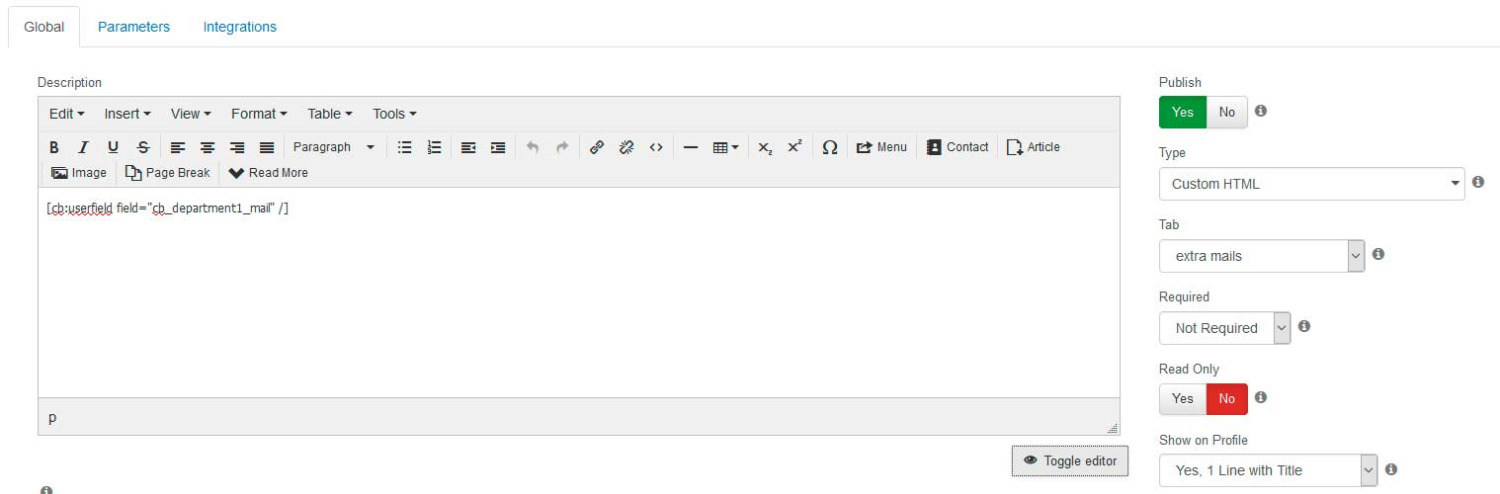
You'd just substitute them into a Custom HTML field as you've discovered except you are using the raw substituted value with [FIELD_NAME] usage. You are likely wanting the HTML output of a field so you need to use [cb:userfield field="FIELD_NAME" /] usage. See the below substitution tutorial for further usage information.
Kyle (Krileon) Community Builder Team Member Before posting on forums:
Read FAQ thoroughly
+
Read our Documentation
+
Search the forums CB links:
Documentation
-
Localization
-
CB Quickstart
-
CB Paid Subscriptions
-
Add-Ons
-
Forge
-- If you are a Professional, Developer, or CB Paid Subscriptions subscriber and have a support issue please always post in your respective support forums for best results!
-- If I've missed your support post with a delay of 3 days or greater and are a Professional, Developer, or CBSubs subscriber please
send me a private message
with your thread and will reply when possible!
-- Please note I am available Monday - Friday from 8:00 AM CST to 4:00 PM CST. I am away on weekends (Saturday and Sunday) and if I've missed your post on or before a weekend after business hours please wait for the next following business day (Monday) and will get to your issue as soon as possible, thank you.
-- My role here is to provide guidance and assistance. I cannot provide custom code for each custom requirement. Please do not inquire me about custom development.
Thank you Krileon or your answer, but probably i was not clear enough on my question.
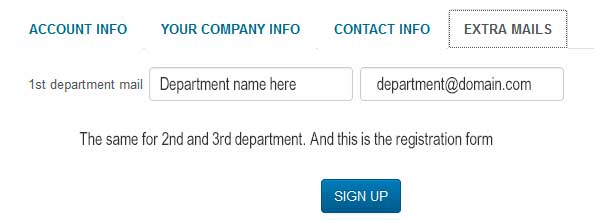
I am sending an image so that you can understand better what we need. I have read the substitutions tutorial several times and i am using substitutions for years.
Please check the image so that we are sure we are talking about the same thing.
According to your suggestion i created a custom html field (image1), but what i get on registration page is (image2).
It would probably just be easier to have 1 field displayed after another as follows.
Field 1
Title: 1st department email
Show on Registration: Yes, 1 Line with Title
Field 2
Show on Registration: yes, 1 Line without Title
Kyle (Krileon) Community Builder Team Member Before posting on forums:
Read FAQ thoroughly
+
Read our Documentation
+
Search the forums CB links:
Documentation
-
Localization
-
CB Quickstart
-
CB Paid Subscriptions
-
Add-Ons
-
Forge
-- If you are a Professional, Developer, or CB Paid Subscriptions subscriber and have a support issue please always post in your respective support forums for best results!
-- If I've missed your support post with a delay of 3 days or greater and are a Professional, Developer, or CBSubs subscriber please
send me a private message
with your thread and will reply when possible!
-- Please note I am available Monday - Friday from 8:00 AM CST to 4:00 PM CST. I am away on weekends (Saturday and Sunday) and if I've missed your post on or before a weekend after business hours please wait for the next following business day (Monday) and will get to your issue as soon as possible, thank you.
-- My role here is to provide guidance and assistance. I cannot provide custom code for each custom requirement. Please do not inquire me about custom development.