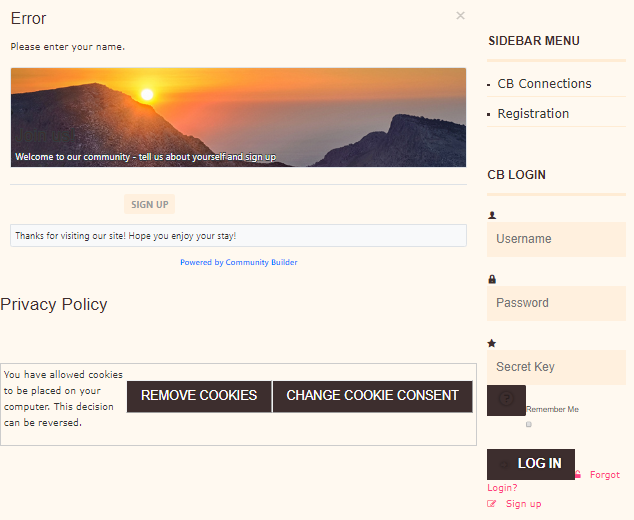
I'm new to Community Builder and still a relatively inexperienced Joomla 3 web builder. We are using Joomla! 3.9.16 and CB 2.4.4.
I can't find the answer to this, have looked in primer book and forums.
When a unregistered user clicks on sign up, they just get an error - please enter your name
I think I have set up the registration details in configuration ok
I'm sure it is a very simple answer
David

Attachments:
Last edit: 5 years 10 months ago by krileon. Reason: Added [SOLVED] tag to subject
Your registration page is empty. Ensure CB Core in CB > Plugin Management is published and public. Next ensure the tabs your fields are on within CB > Tab Management are at least published. You can check this within CB > Field Management as the tabs name will be in red if it's not published. This is not default behavior so it would've had to of been changed to this.
I suggest reading through the CB Primer Book, which you can download below and our videos to get started with CB.
Kyle (Krileon) Community Builder Team Member Before posting on forums:
Read FAQ thoroughly
+
Read our Documentation
+
Search the forums CB links:
Documentation
-
Localization
-
CB Quickstart
-
CB Paid Subscriptions
-
Add-Ons
-
Forge
-- If you are a Professional, Developer, or CB Paid Subscriptions subscriber and have a support issue please always post in your respective support forums for best results!
-- If I've missed your support post with a delay of 3 days or greater and are a Professional, Developer, or CBSubs subscriber please
send me a private message
with your thread and will reply when possible!
-- Please note I am available Monday - Friday from 8:00 AM CST to 4:00 PM CST. I am away on weekends (Saturday and Sunday) and if I've missed your post on or before a weekend after business hours please wait for the next following business day (Monday) and will get to your issue as soon as possible, thank you.
-- My role here is to provide guidance and assistance. I cannot provide custom code for each custom requirement. Please do not inquire me about custom development.
The following user(s) said Thank You: Stjameschurch
Many thanks once again Kyle. I actually found the problem was that I had set the access level to Restricted instead of Public therefore it couldn't be seen. For info I had read the primer book several times but hadn't found the answer. The tabs are all published so it is now working.