Skip to Content Skip to Menu

Family Plan Config

  • adhillon
  • adhillon
  • ONLINE
  • Posts: 146
  • Thanks: 6
  • Karma: 1
3 hours 17 minutes ago #343276 by adhillon
Family Plan Config was created by adhillon
Hi,
We are planning a new family-oriented service, and need your guidance of configuring the subscription plans shown below.

[BASELINE PLAN]
Family Pack of 8 members (monthly subscription)

[ADDITIONAL MEMBERS PLANS]
+5 members pack
+10 members pack

[ADD-ON SERVICE]
Training Modules  (the service will be a add-on to the Family Pack and accessible to all plan members)

Please advise. 
 

Please Log in or Create an account to join the conversation.

  • krileon
  • krileon
  • ONLINE
  • Posts: 50140
  • Thanks: 8577
  • Karma: 1469
2 hours 50 minutes ago - 2 hours 49 minutes ago #343277 by krileon
Replied by krileon on topic Family Plan Config
You'll need CBSubs Family Plans, CBSubs Options, and CBSubs Fields to do that. First configure your base plan however you like (e.g. $50/year) with your base pricing. Next create a field in CB > Field Management to store how many shares the user is allowed for that plan. Lets call that field cb_familypack just for the sake of this example. The below configuration should then work.

Plan > Integrations > Options > Options
Plan Options: Enabled
Field 1
Title: Family
Name: family
Type: Drop Down (Single Select)
Values:
Value = 8, Label = 8 Members, Price = +0
Value = 13, Label = 13 Members, Price = +20
Value = 18, Label = 18 Members, Price = +30
Required: Yes
Default: 8
Field 2
Title: Services
Name: services
Type: Check Box (Multiple)
Values:
Value = training, Label = Training, Price = ++10

Plan > Integrations > CBSubs Fields
Field: cb_familypack
Operator: Set: Field = Value
Value: [PLAN_OPTS_OPTION_FAMILY]
Remove value on plan deactivation: Yes
Value on plan deactivation: 0

Plan > Integrations > Family Plans
Sharing: Yes
Limit: cb_familypack

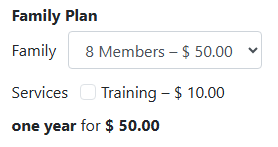
That should give you a single plan, that has pricing options, that can dynamically adjust the share count. Below is what such a plan would look like.


You can use different field types if you want as well. This is just an example so feel free to modify it as needed, but please be mindful of option name and field name in my example as they're relevant to the configuration.


Kyle (Krileon)
Community Builder Team Member
Before posting on forums: Read FAQ thoroughly + Read our Documentation + Search the forums
CB links: Documentation - Localization - CB Quickstart - CB Paid Subscriptions - Add-Ons - Forge
--
If you are a Professional, Developer, or CB Paid Subscriptions subscriber and have a support issue please always post in your respective support forums for best results!
--
If I've missed your support post with a delay of 3 days or greater and are a Professional, Developer, or CBSubs subscriber please send me a private message with your thread and will reply when possible!
--
Please note I am available Monday - Friday from 8:00 AM CST to 4:00 PM CST. I am away on weekends (Saturday and Sunday) and if I've missed your post on or before a weekend after business hours please wait for the next following business day (Monday) and will get to your issue as soon as possible, thank you.
--
My role here is to provide guidance and assistance. I cannot provide custom code for each custom requirement. Please do not inquire me about custom development.
Last edit: 2 hours 49 minutes ago by krileon. Reason: added screenshot

Please Log in or Create an account to join the conversation.

Moderators: beatnantkrileon
Powered by Kunena Forum