Skip to Content Skip to Menu

🐰 Happy Easter! Great Savings on Professional and Developer Memberships! Get 20% off now with code EASTER-2026!

Solved/ management of comprofiler media folders

  • Toulouzing
  • Toulouzing
  • ONLINE
  • Posts: 189
  • Thanks: 18
  • Karma: 2
1 day 13 hours ago #343584 by Toulouzing
management of comprofiler media folders was created by Toulouzing
Hello! 

As superadmin, i need to manage the quantity of photo posted by user (number or size of folders). I do not find obvious or easy solution except calculating user ID folder size using properties of folder within FTP app.

Searching for better solutions, i have some questions :

Is there any mean for a superuser to identify photos posted on activity stream (supposed to be obsolete after a certain period) and photos within other galleries (supposed to be permanently available)
Any idea to easily know the number of photo per user ?
Is the CG Gallery v4 will allow to display the image in the backend media/comprofiler folder ?

Any ideas or thoughts welcomed

Please Log in or Create an account to join the conversation.

  • krileon
  • krileon
  • ONLINE
  • Posts: 50285
  • Thanks: 8609
  • Karma: 1470
1 day 6 hours ago - 1 day 5 hours ago #343588 by krileon
Replied by krileon on topic management of comprofiler media folders
I don't see why the folder structure is entirely relevant. You can see everything they've shared within CB Gallery > Media and is where media is managed. I can see about quickly adding a new backend Files view to CB Gallery > Media accessed from the top menu to list all the files, their file sizes, etc.. since Media doesn't show file sizes.

Any idea to easily know the number of photo per user ?

If you know the user you want to check then you can also just filter CB Gallery > Media using Search Tools by Owner and that'll give you the total at the bottom of the page. Alternative you can just query for that from _comprofiler_plugin_gallery_items database table. Can use a CB Query Field for example and have it displayed on profile.


Kyle (Krileon)
Community Builder Team Member
Before posting on forums: Read FAQ thoroughly + Read our Documentation + Search the forums
CB links: Documentation - Localization - CB Quickstart - CB Paid Subscriptions - Add-Ons - Forge
--
If you are a Professional, Developer, or CB Paid Subscriptions subscriber and have a support issue please always post in your respective support forums for best results!
--
If I've missed your support post with a delay of 3 days or greater and are a Professional, Developer, or CBSubs subscriber please send me a private message with your thread and will reply when possible!
--
Please note I am available Monday - Friday from 8:00 AM CST to 4:00 PM CST. I am away on weekends (Saturday and Sunday) and if I've missed your post on or before a weekend after business hours please wait for the next following business day (Monday) and will get to your issue as soon as possible, thank you.
--
My role here is to provide guidance and assistance. I cannot provide custom code for each custom requirement. Please do not inquire me about custom development.
Last edit: 1 day 5 hours ago by krileon.

Please Log in or Create an account to join the conversation.

  • krileon
  • krileon
  • ONLINE
  • Posts: 50285
  • Thanks: 8609
  • Karma: 1470
1 day 5 hours ago #343590 by krileon
Replied by krileon on topic management of comprofiler media folders
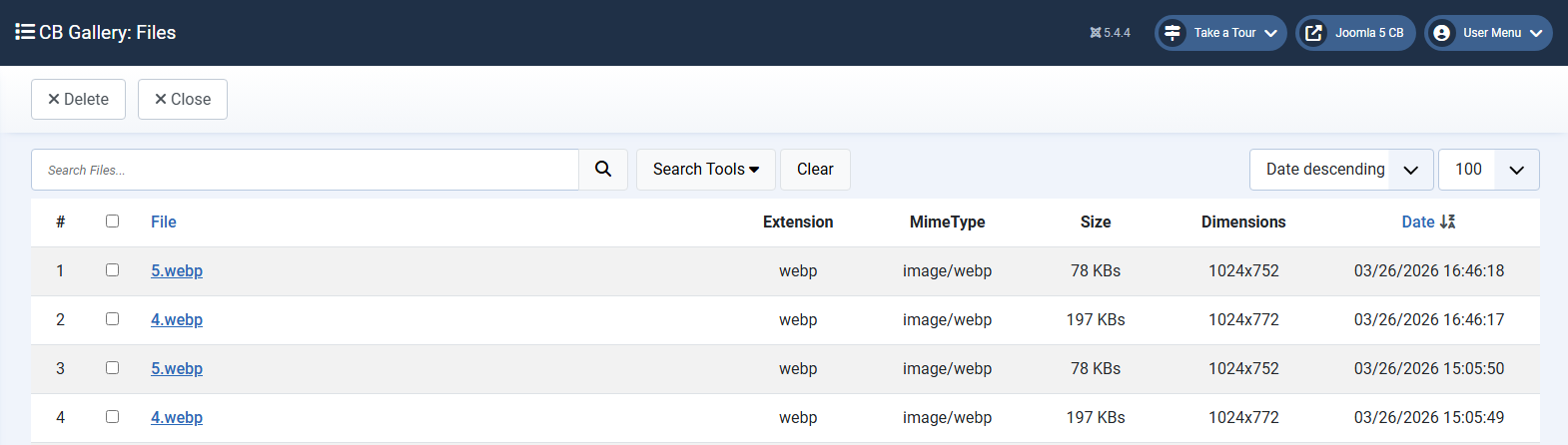
Ok, we've some down time before I can release as we've to do some server things on our end so I went ahead and added a files management page for next release. It'll look like the following.


This can be filtered same as the Media page. Clicking files links back to the Media page as well. As for Joomla's media manager the plan is to move user files out of the media folder entirely in a future release so I currently don't have any plans to allow management from there as deleting a file there would not delete it from the database and would cause a lot of broken display.


Kyle (Krileon)
Community Builder Team Member
Before posting on forums: Read FAQ thoroughly + Read our Documentation + Search the forums
CB links: Documentation - Localization - CB Quickstart - CB Paid Subscriptions - Add-Ons - Forge
--
If you are a Professional, Developer, or CB Paid Subscriptions subscriber and have a support issue please always post in your respective support forums for best results!
--
If I've missed your support post with a delay of 3 days or greater and are a Professional, Developer, or CBSubs subscriber please send me a private message with your thread and will reply when possible!
--
Please note I am available Monday - Friday from 8:00 AM CST to 4:00 PM CST. I am away on weekends (Saturday and Sunday) and if I've missed your post on or before a weekend after business hours please wait for the next following business day (Monday) and will get to your issue as soon as possible, thank you.
--
My role here is to provide guidance and assistance. I cannot provide custom code for each custom requirement. Please do not inquire me about custom development.
The following user(s) said Thank You: Toulouzing

Please Log in or Create an account to join the conversation.

  • Toulouzing
  • Toulouzing
  • ONLINE
  • Posts: 189
  • Thanks: 18
  • Karma: 2
1 day 3 hours ago #343600 by Toulouzing
Replied by Toulouzing on topic Solved/ management of comprofiler media folders

 If you know the user you want to check then you can also just filter CB Gallery > Media using Search Tools by Owner and that'll give you the total at the bottom of the page. Alternative you can just query for that from _comprofiler_plugin_gallery_items database table. Can use a CB Query Field for example and have it displayed on profile.

Oh, of course > That's may fit to my need - I did not notice before i have already the data available

Ok, we've some down time before I can release as we've to do some server things on our end so I went ahead and added a files management page for next release. It'll look like the following.

Thank you so much, I really appreciate this 

With your inputs, i will wait a bit and explore the solutions. I close the subject

Please Log in or Create an account to join the conversation.

Moderators: beatnantkrileon
Powered by Kunena Forum