


Skip to Content Skip to Menu

Modul Hashtag Version Cloud

  • Juhuui
  • Juhuui
  • OFFLINE
  • Posts: 12
  • Thanks: 1
  • Karma: 0
1 month 2 weeks ago #344320 by Juhuui
Modul Hashtag Version Cloud was created by Juhuui
Hi there
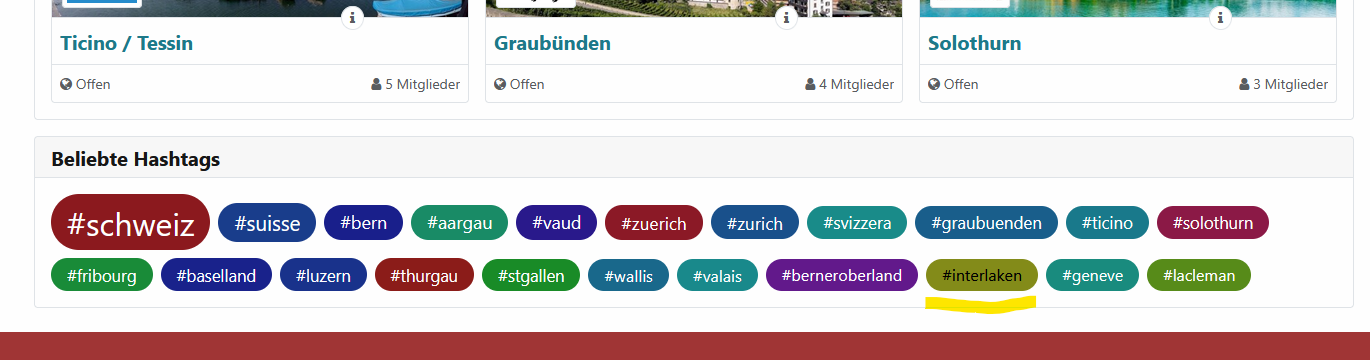
All my cloud hashtags have white text. Except for one, which is incorrectly black. Why?

See my printscreen
Attachments:

Please Log in or Create an account to join the conversation.

  • krileon
  • krileon
  • ONLINE
  • Posts: 50678
  • Thanks: 8687
  • Karma: 1474
1 month 2 weeks ago #344321 by krileon
Replied by krileon on topic Modul Hashtag Version Cloud
That's what the CSS function "contrast-color" determined the color should be. The coloring and size are entirely controlled by CSS variables so you can customize it if you like. --hashtag-scale is the scale it determined based off the popularity of the hashtag and --hashtag-color is the random color based off the hashtag string itself.


Kyle (Krileon)
Community Builder Team Member
Before posting on forums: Read FAQ thoroughly + Read our Documentation + Search the forums
CB links: Documentation - Localization - CB Quickstart - CB Paid Subscriptions - Add-Ons - Forge
--
If you are a Professional, Developer, or CB Paid Subscriptions subscriber and have a support issue please always post in your respective support forums for best results!
--
If I've missed your support post with a delay of 3 days or greater and are a Professional, Developer, or CBSubs subscriber please send me a private message with your thread and will reply when possible!
--
Please note I am available Monday - Friday from 8:00 AM CST to 4:00 PM CST. I am away on weekends (Saturday and Sunday) and if I've missed your post on or before a weekend after business hours please wait for the next following business day (Monday) and will get to your issue as soon as possible, thank you.
--
My role here is to provide guidance and assistance. I cannot provide custom code for each custom requirement. Please do not inquire me about custom development.
The following user(s) said Thank You: Juhuui

Please Log in or Create an account to join the conversation.
  • Juhuui
  • Juhuui
  • OFFLINE
  • Posts: 12
  • Thanks: 1
  • Karma: 0
1 month 1 week ago #344332 by Juhuui
Replied by Juhuui on topic Modul Hashtag Version Cloud
Thanks for your message. I think I'm stupid... sorry

Because it's a Joomla module i tried with a modul-class in the backend (.hashtag-modul)
I would like all cloud boxes in red with white font.

I tried with follow codes;

.hashtag-modul .cb_activity_hashtag a:hover {
    color: #ffffff !important;
    background-color: #832320;
    text-decoration: none;
}

History cleared and page reloaded in the browser. But don't work as i like
 

Please Log in or Create an account to join the conversation.

  • Juhuui
  • Juhuui
  • OFFLINE
  • Posts: 12
  • Thanks: 1
  • Karma: 0
1 month 1 week ago #344333 by Juhuui
Replied by Juhuui on topic Modul Hashtag Version Cloud
And i tried without modul-class;

.cb_template .cbActivityModuleHashtagLink a:hover {
color: #ffffff !important;
background-color: #832320;
text-decoration: none;
}


But still not work

Please Log in or Create an account to join the conversation.

  • krileon
  • krileon
  • ONLINE
  • Posts: 50678
  • Thanks: 8687
  • Karma: 1474
1 month 1 week ago #344339 by krileon
Replied by krileon on topic Modul Hashtag Version Cloud
The following works fine in my tests.
Code:
.cbActivityModuleHashtags .cbActivityModuleHashtagLink { color: #ffffff !important; background-color: #832320 !important; }

You should be able to apply this through CBs CSS overrides feature shown below or using Joomla's user.css file.

www.joomlapolis.com/blog/kyle/18711-template-css-overrides-made-easy


Kyle (Krileon)
Community Builder Team Member
Before posting on forums: Read FAQ thoroughly + Read our Documentation + Search the forums
CB links: Documentation - Localization - CB Quickstart - CB Paid Subscriptions - Add-Ons - Forge
--
If you are a Professional, Developer, or CB Paid Subscriptions subscriber and have a support issue please always post in your respective support forums for best results!
--
If I've missed your support post with a delay of 3 days or greater and are a Professional, Developer, or CBSubs subscriber please send me a private message with your thread and will reply when possible!
--
Please note I am available Monday - Friday from 8:00 AM CST to 4:00 PM CST. I am away on weekends (Saturday and Sunday) and if I've missed your post on or before a weekend after business hours please wait for the next following business day (Monday) and will get to your issue as soon as possible, thank you.
--
My role here is to provide guidance and assistance. I cannot provide custom code for each custom requirement. Please do not inquire me about custom development.
The following user(s) said Thank You: Juhuui

Please Log in or Create an account to join the conversation.

Moderators: beatnantkrileon
Powered by Kunena Forum

