Skip to Content Skip to Menu

CB Gallery - Unable to delete or edit uploaded images

  • huntrdog
  • huntrdog
  • ONLINE
  • Posts: 39
  • Thanks: 5
  • Karma: 0
1 hour 29 minutes ago #344384 by huntrdog
Hello,

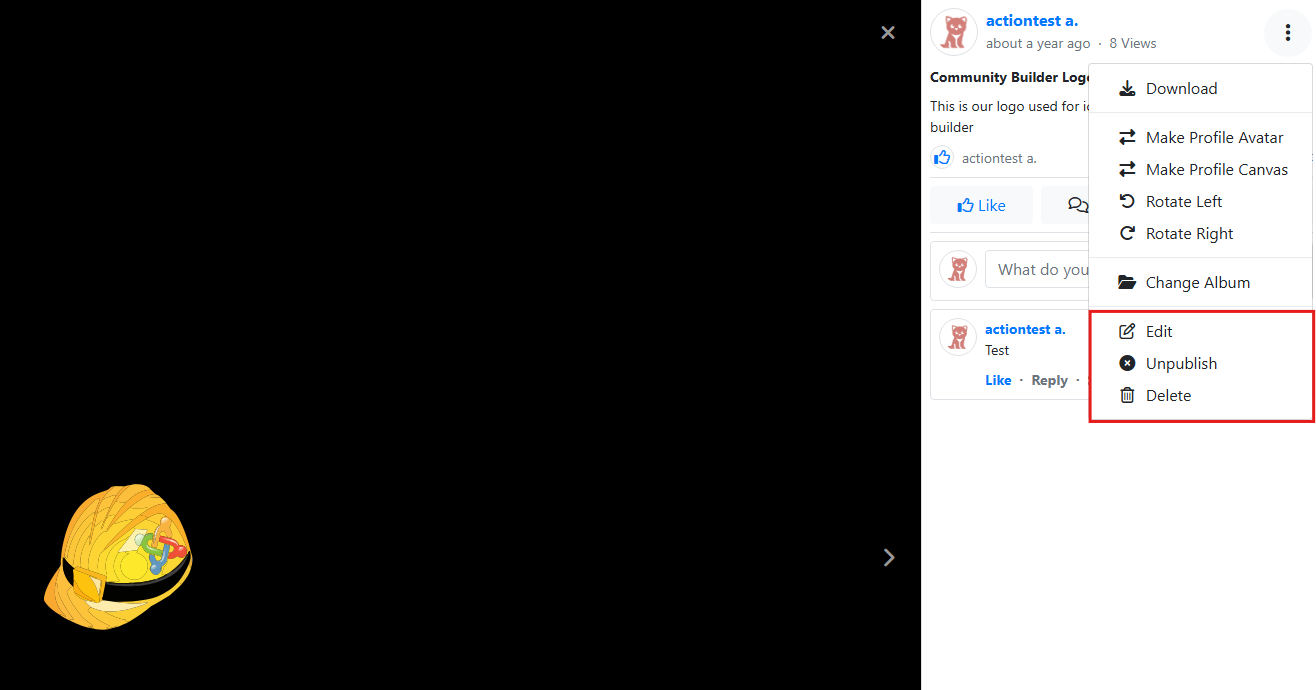
I must have something set incorrectly, as users nor super admin is able to delete or edit uploaded CB gallery media. Only "Share Media" and "Create Album" buttons are present. 

Thank you in advance for your guidance. 

Please Log in or Create an account to join the conversation.

  • krileon
  • krileon
  • ONLINE
  • Posts: 50633
  • Thanks: 8674
  • Karma: 1474
1 hour 27 minutes ago #344385 by krileon
You should see the buttons for that in the modal window. Is the below menu items not showing?


Is this on the profile gallery? Uploads to CB Activity?


Kyle (Krileon)
Community Builder Team Member
Before posting on forums: Read FAQ thoroughly + Read our Documentation + Search the forums
CB links: Documentation - Localization - CB Quickstart - CB Paid Subscriptions - Add-Ons - Forge
--
If you are a Professional, Developer, or CB Paid Subscriptions subscriber and have a support issue please always post in your respective support forums for best results!
--
If I've missed your support post with a delay of 3 days or greater and are a Professional, Developer, or CBSubs subscriber please send me a private message with your thread and will reply when possible!
--
Please note I am available Monday - Friday from 8:00 AM CST to 4:00 PM CST. I am away on weekends (Saturday and Sunday) and if I've missed your post on or before a weekend after business hours please wait for the next following business day (Monday) and will get to your issue as soon as possible, thank you.
--
My role here is to provide guidance and assistance. I cannot provide custom code for each custom requirement. Please do not inquire me about custom development.

Please Log in or Create an account to join the conversation.

  • huntrdog
  • huntrdog
  • ONLINE
  • Posts: 39
  • Thanks: 5
  • Karma: 0
53 minutes ago #344387 by huntrdog
No modal window. Images appear in a new window. 

Please Log in or Create an account to join the conversation.

  • krileon
  • krileon
  • ONLINE
  • Posts: 50633
  • Thanks: 8674
  • Karma: 1474
45 minutes ago #344388 by krileon
That typically means something on the page is completely breaking the JavaScript. Enable debug mode and maximum error reporting in Joomla global configuration. Then navigate to the gallery on frontend. Once there press F12 to open your browsers developer tools and select the Console tab. Now refresh the page and see if there's any errors. They should be highlighted red if there are any.


Kyle (Krileon)
Community Builder Team Member
Before posting on forums: Read FAQ thoroughly + Read our Documentation + Search the forums
CB links: Documentation - Localization - CB Quickstart - CB Paid Subscriptions - Add-Ons - Forge
--
If you are a Professional, Developer, or CB Paid Subscriptions subscriber and have a support issue please always post in your respective support forums for best results!
--
If I've missed your support post with a delay of 3 days or greater and are a Professional, Developer, or CBSubs subscriber please send me a private message with your thread and will reply when possible!
--
Please note I am available Monday - Friday from 8:00 AM CST to 4:00 PM CST. I am away on weekends (Saturday and Sunday) and if I've missed your post on or before a weekend after business hours please wait for the next following business day (Monday) and will get to your issue as soon as possible, thank you.
--
My role here is to provide guidance and assistance. I cannot provide custom code for each custom requirement. Please do not inquire me about custom development.

Please Log in or Create an account to join the conversation.

Moderators: beatnantkrileon
Powered by Kunena Forum