Skip to Content Skip to Menu

🐰 Happy Easter! Great Savings on Professional and Developer Memberships! Get 20% off now with code EASTER-2026!

Problem getting Test Clock to work with Inline Forms vs Hosted

1 day 5 hours ago #343591 by STUCKSHUTTER
I am stumped with how to get the test clock in the sandbox to work.  I can get the transactions to show up registed, paid, and subscribed if in the Gateway settings, I select Hosted (Checkout) but then the Test Clock will not work with that setting. It shows as set to "Null'.  If I select Inline Forms (Elements), the transaction remains in pending status in CBSubs/Payments. 
I am hoping you can let me know the steps to take to resolve this situation so I can test future payments with the Test Clock.
Thank you in advance for any help you can provide.
Chris

Please Log in or Create an account to join the conversation.

  • krileon
  • krileon
  • ONLINE
  • Posts: 50285
  • Thanks: 8609
  • Karma: 1470
1 day 5 hours ago #343592 by krileon
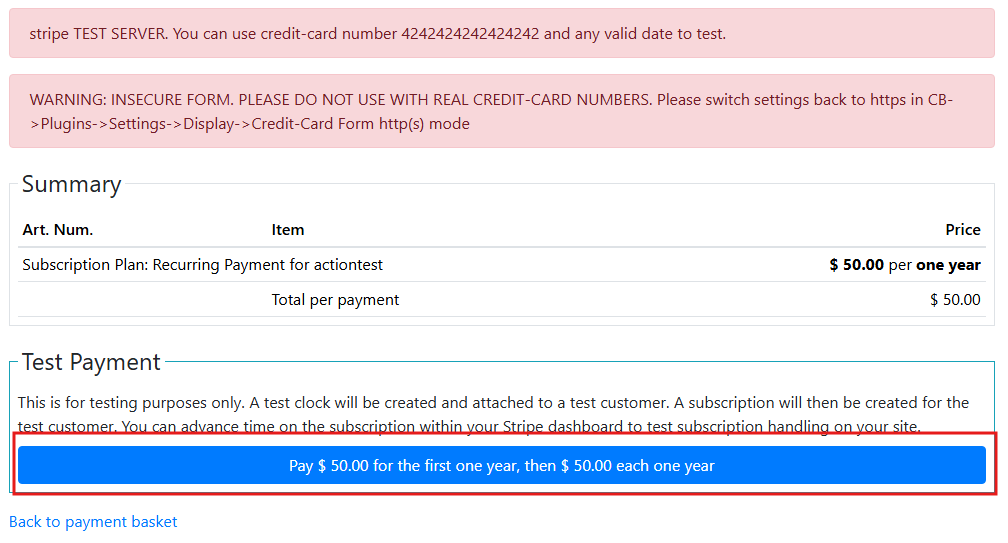
You cannot use test clocks with hosted checkout. Switch back to inline elements. Once you've done so when you go to subscribe the payment area where you normally input credit card details will just have a button to pay with a test clock. Test clocks don't immediately activate. They generate an invoice that is paid out and CBSubs will handle the webhook sent by that payment. So if you do not have webhooks properly configured CBSubs will never be notified of payments. Webhook configuration instructions are included in the CBSubs Stripe gateway configuration. You can then advance a test clock within your Stripe account to pass time on the subscription.


Kyle (Krileon)
Community Builder Team Member
Before posting on forums: Read FAQ thoroughly + Read our Documentation + Search the forums
CB links: Documentation - Localization - CB Quickstart - CB Paid Subscriptions - Add-Ons - Forge
--
If you are a Professional, Developer, or CB Paid Subscriptions subscriber and have a support issue please always post in your respective support forums for best results!
--
If I've missed your support post with a delay of 3 days or greater and are a Professional, Developer, or CBSubs subscriber please send me a private message with your thread and will reply when possible!
--
Please note I am available Monday - Friday from 8:00 AM CST to 4:00 PM CST. I am away on weekends (Saturday and Sunday) and if I've missed your post on or before a weekend after business hours please wait for the next following business day (Monday) and will get to your issue as soon as possible, thank you.
--
My role here is to provide guidance and assistance. I cannot provide custom code for each custom requirement. Please do not inquire me about custom development.

Please Log in or Create an account to join the conversation.

1 day 5 hours ago #343593 by STUCKSHUTTER
Thank you Krileon. I am pretty certain the webhook is properly configured since i checed it several times yesterday in getting the sandbox to work. I'll check again. Is there a transaction i should see that would tell me how far the registration made it befor stalling out?
Many thanks for the quick reply, greatly appreciated.
Chris

Please Log in or Create an account to join the conversation.

  • krileon
  • krileon
  • ONLINE
  • Posts: 50285
  • Thanks: 8609
  • Karma: 1470
1 day 4 hours ago - 1 day 4 hours ago #343594 by krileon
Your test clock should immediately exist in your Stripe account and the subscription as well. It won't stall out. It'll just exist and retry webhooks if the webhooks failed for whatever reason. We respond to all of Stripes webhooks with a response message so the webhook log should also show return messages.

Test Clocks are solely for the purpose of testing recurring subscriptions. You do not need them for regular test payments nor will they work for regular test payments. They only work for recurring subscriptions.


Kyle (Krileon)
Community Builder Team Member
Before posting on forums: Read FAQ thoroughly + Read our Documentation + Search the forums
CB links: Documentation - Localization - CB Quickstart - CB Paid Subscriptions - Add-Ons - Forge
--
If you are a Professional, Developer, or CB Paid Subscriptions subscriber and have a support issue please always post in your respective support forums for best results!
--
If I've missed your support post with a delay of 3 days or greater and are a Professional, Developer, or CBSubs subscriber please send me a private message with your thread and will reply when possible!
--
Please note I am available Monday - Friday from 8:00 AM CST to 4:00 PM CST. I am away on weekends (Saturday and Sunday) and if I've missed your post on or before a weekend after business hours please wait for the next following business day (Monday) and will get to your issue as soon as possible, thank you.
--
My role here is to provide guidance and assistance. I cannot provide custom code for each custom requirement. Please do not inquire me about custom development.
Last edit: 1 day 4 hours ago by krileon.

Please Log in or Create an account to join the conversation.

  • krileon
  • krileon
  • ONLINE
  • Posts: 50285
  • Thanks: 8609
  • Karma: 1470
1 day 4 hours ago #343596 by krileon
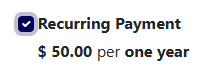
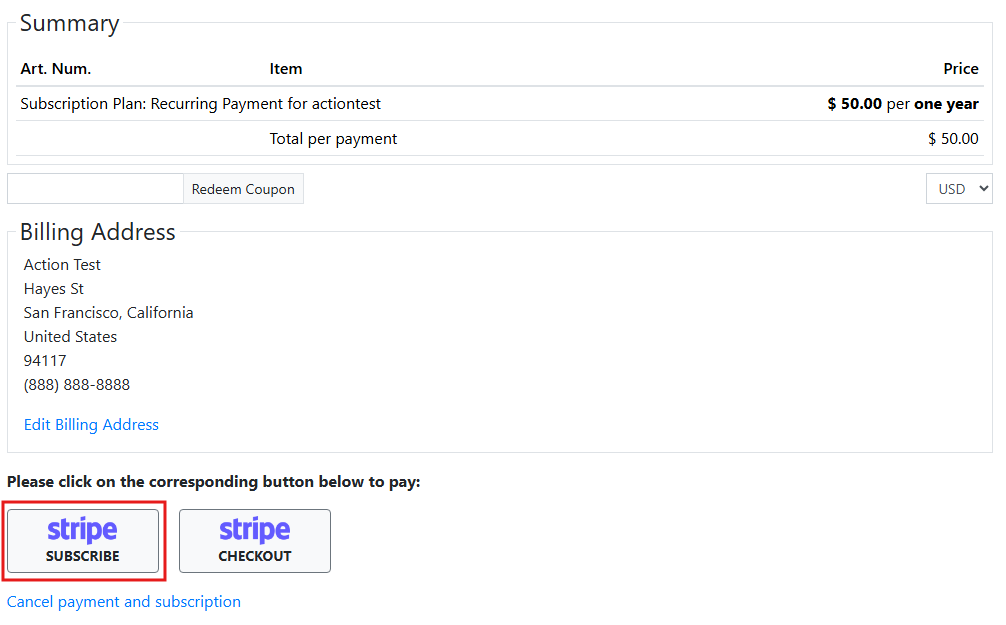
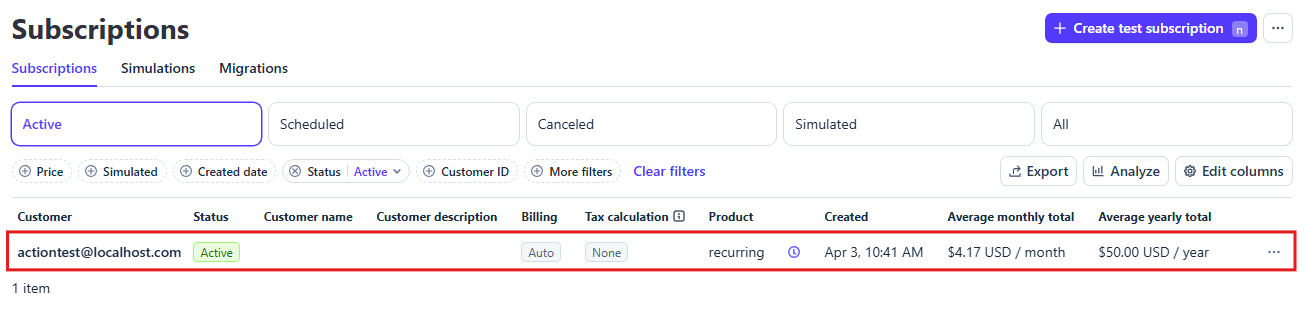
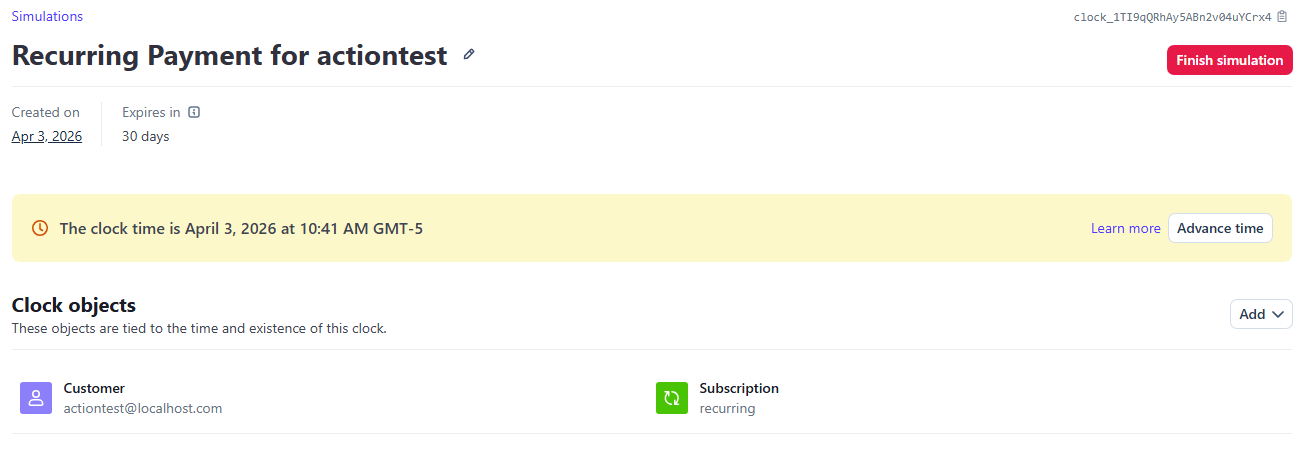
There's no real complicated process here. It's a simple matter of just pressing the button and advancing the clock from Stripe. Below is a step by step.

1. Plan Selection
 
2. Basket
 
3. Payment
 
4. Confirmation
 
5. Stripe Subscriptions
 
6. Stripe Test Clocks (Simulations)
 
7. Stripe Test Clock (Simulation)
 

Step 7 is where you'd advance time on the subscription to see how renewals would behavior. That's basically the only purpose to using test clocks. Additional details below.

Notification Log


Kyle (Krileon)
Community Builder Team Member
Before posting on forums: Read FAQ thoroughly + Read our Documentation + Search the forums
CB links: Documentation - Localization - CB Quickstart - CB Paid Subscriptions - Add-Ons - Forge
--
If you are a Professional, Developer, or CB Paid Subscriptions subscriber and have a support issue please always post in your respective support forums for best results!
--
If I've missed your support post with a delay of 3 days or greater and are a Professional, Developer, or CBSubs subscriber please send me a private message with your thread and will reply when possible!
--
Please note I am available Monday - Friday from 8:00 AM CST to 4:00 PM CST. I am away on weekends (Saturday and Sunday) and if I've missed your post on or before a weekend after business hours please wait for the next following business day (Monday) and will get to your issue as soon as possible, thank you.
--
My role here is to provide guidance and assistance. I cannot provide custom code for each custom requirement. Please do not inquire me about custom development.

Please Log in or Create an account to join the conversation.

1 day 4 hours ago #343598 by STUCKSHUTTER
Everything tracked exactly as shown, but the status still remains Pending.  I double-checked the webhook destination, signing secret, published and secret keys, and they all match. I'm hoping you can help me figure out what's wrong. They say, "You have to be smarter than the gear you are trying to use," and I am clearly failing that test. I really hate to ask for more help because you've done such a great job helping, but would I be crazy to see if you could help a bit more?
Thank you,
Chris

Please Log in or Create an account to join the conversation.

Moderators: beatnantkrileon
Powered by Kunena Forum