I've reviewed your install again and went through the steps for your only paid plan. Everything seams to have worked perfectly fine. Below is the payment complete page.
Your test payment seams to have other payments attached to it. Are you purchasing just the paid plan or your other plans that are free with CBSubs Options? By doing that you're creating a Schedule because that's the only way for stripe to reconcile multiple payments being stacked. A Schedule can take up to a day to clear, but you'll see it in your Stripe Dashboard. Below is the direct URL to the subscriptions page at Stripe.
Subscriptions
dashboard.stripe.com/test/subscriptions?status=active
Test Clocks
dashboard.stripe.com/test/billing/subscriptions/test-clocks
I don't have any way to workaround this. That's just how Stripe works. I've made requests to improve their API in this regard, but nothing has came of it yet.
As for why it's stuck pending it seams Stripe webhooks cannot reach your site. There's no IPN processing from Stripe at all. Suggest checking your webhook log to see why. The below URL should go directly to the log.
dashboard.stripe.com/test/workbench/logs
dashboard.stripe.com/test/workbench/events
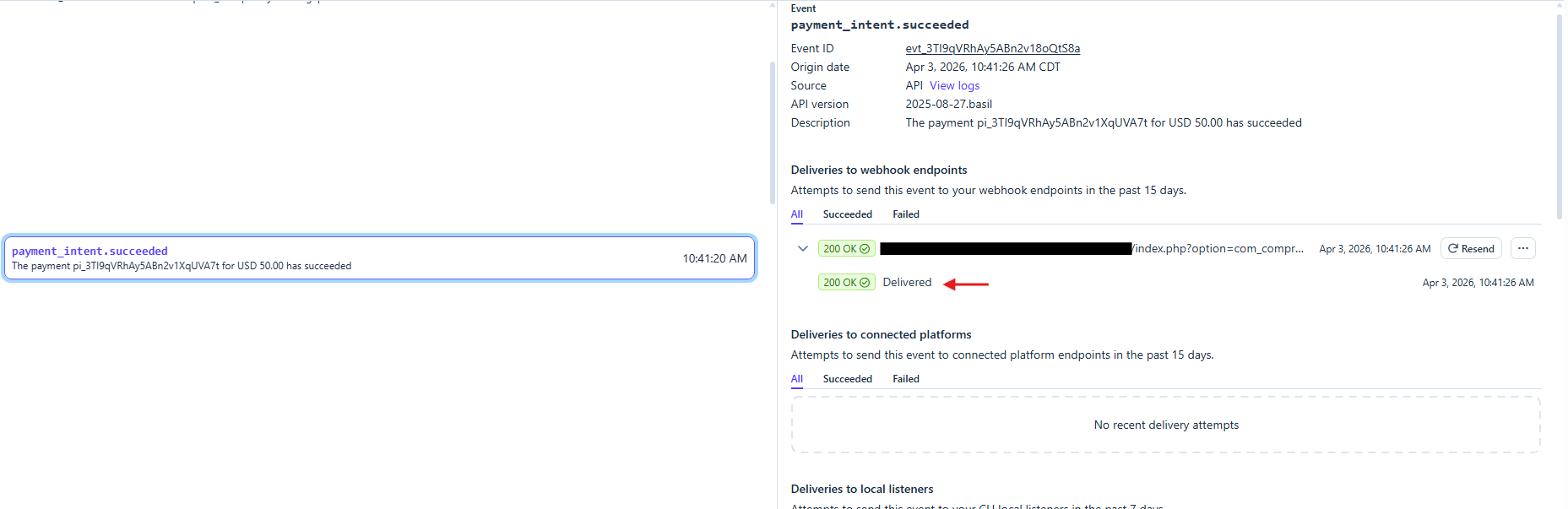
Please be sure your webhook is only sending the events CBSubs is expecting. The list of events is within your CBSubs Stripe gateway configuration. The below for example would be a successfully received event.
Where the arrow is you can click to see CBSubs response message. It should have a "Response body" for each webhook CBSubs handled to tell you how CBSubs responded. I suspect though your subscription schedule just needs time to process as well, which you can fast forward using the test clock.


 krileon