Skip to Content Skip to Menu

Rendering of avatar picture is different depending of the 'way' you do it

6 days 22 hours ago - 6 days 22 hours ago #344403 by erichburkhard
CB version: 2.11.0+build.2026.01.12.21.55.56.a25ef0f6c
Joomla version: 5.4.8
Gallery plugin: 4.1.2
Canvas Layout: yes I am using it


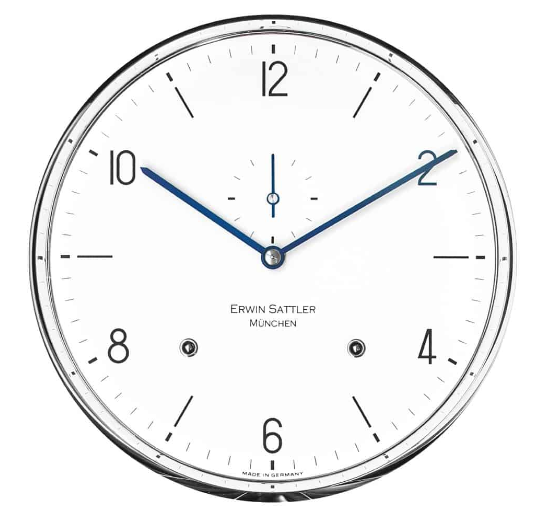
At the moment I have a strange behaviour concerning the process of setting an avatar picture for a certain profile. Let me show you what I mean. The picture I am using for an avatar is this .png file:


So for the first  profile (= Peter) we do the following:
1. Login as Peter in the frontend
2. Update the profile of Peter and upload the above image as an avatar for Peter
3. Login as moderator and approve the avatar picture for Peter
4. Finish


For the second profile (= Alois) whe we do the following:
1. Login as Alois in the frontend
2. Choose the gallery tab of Alois and upload the above image as part of his gallery images.
3. Login as moderator and approve this gallery picture for Alois
4. Login as Alois again in the frontend
5. Choose the Gallery of Alois and select the (approved) gallery picture
6. Now execute the action: 'Make Profile avatar' on the selected gallery picture
7. Finish

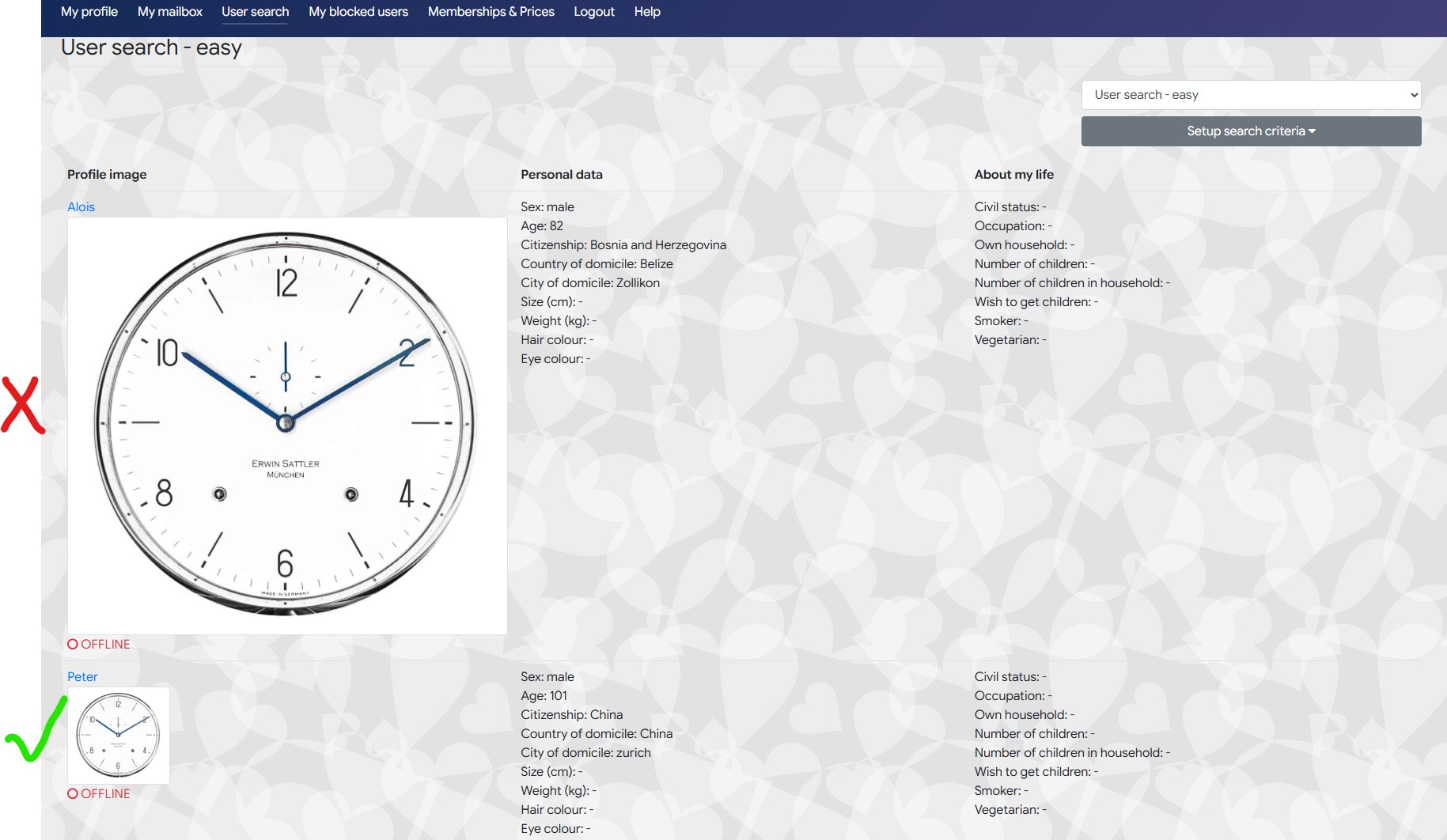
.... Now select the 'User search' menu item (either as Alois or Peter or moderator) ..... the result looks like this:


As you can see the avatar picture which has been placed via ... Gallery / Make Profile avatar .... is rendered differently (too big!) .... From my point of view an avatar picture should always rendered the same way, independently from where it came frome .... what do you think? Or is the bug on my side?

Regards



Last edit: 6 days 22 hours ago by erichburkhard.

Please Log in or Create an account to join the conversation.

  • krileon
  • krileon
  • ONLINE
  • Posts: 50659
  • Thanks: 8682
  • Karma: 1474
5 days 23 hours ago #344404 by krileon
You didn't supply a thumbnail size for the gallery image. When adding images to the image fields gallery folder you need to supply 2. 1 is the full size and 1 is the thumbnail size. The thumbnail size should be named exactly the same as the full size image except prefixed with "tn".


Kyle (Krileon)
Community Builder Team Member
Before posting on forums: Read FAQ thoroughly + Read our Documentation + Search the forums
CB links: Documentation - Localization - CB Quickstart - CB Paid Subscriptions - Add-Ons - Forge
--
If you are a Professional, Developer, or CB Paid Subscriptions subscriber and have a support issue please always post in your respective support forums for best results!
--
If I've missed your support post with a delay of 3 days or greater and are a Professional, Developer, or CBSubs subscriber please send me a private message with your thread and will reply when possible!
--
Please note I am available Monday - Friday from 8:00 AM CST to 4:00 PM CST. I am away on weekends (Saturday and Sunday) and if I've missed your post on or before a weekend after business hours please wait for the next following business day (Monday) and will get to your issue as soon as possible, thank you.
--
My role here is to provide guidance and assistance. I cannot provide custom code for each custom requirement. Please do not inquire me about custom development.
The following user(s) said Thank You: erichburkhard

Please Log in or Create an account to join the conversation.

5 days 4 hours ago #344408 by erichburkhard
OK - I understand... so the 'Make Profile avatar' functionality has the prerequisite that the user has to deliver 2 formats of the same picture (if he decides later on to use the corresponding image as an avatar) ....correct?

But this fact could have the following 'weird' user experience for a certain user:

Scenario:
-  Let's assume I am user 'Alois' who has registered in to my website
-  User 'Alois' now decides to upload 1 avatar picture and  a few other pictures into his gallery tab .... at the moment everything looks fine .... and also the 'user search' list looks fine for him ... everything is ok
-  After a week ....user 'Alois' decides to replace his existing avatar picture by an other gallery picture (using: Make Profile avatar)
-  user 'Alois' executes a 'user search' .....and the list looks now very 'weird' because all the avatar pictures of the other members look well formatted except his own avatar  ... and of course user 'Alois' does not know how to fix it (because nobody tells him that he has to 'deliver' a thumbnail version when using the Make Profile avatar function) .... and also if he knew this: ..... Alois is not able to create a thumbnail version of  a certain picture if he just uses his mobile phone ....

So my question is ....wouldn't it be better that the avatar creation process is transparent for the user? This means: If a users uploads an avatar picture directly he does not care about a thumbnail .... and if he decides to create an avatar (indirectly) via gallery (using: Make Profile avatar) he also should not care about a thumbnail ..... this would definitely increase the user experience...

I understand ... this would be an new requirement ..... but anyway: this is just my  'loud thinking'

Regards

Please Log in or Create an account to join the conversation.

  • krileon
  • krileon
  • ONLINE
  • Posts: 50659
  • Thanks: 8682
  • Karma: 1474
5 days 33 minutes ago - 5 days 33 minutes ago #344409 by krileon
Oh, sorry. I misunderstood which gallery you were referring to. So this is an avatar they've set from CB Gallery? That should properly size a thumbnail. That sounds like a possible bug. Will look into this further and make sure that feature is properly generating the correctly sized images.

forge.joomlapolis.com/issues/9921


Kyle (Krileon)
Community Builder Team Member
Before posting on forums: Read FAQ thoroughly + Read our Documentation + Search the forums
CB links: Documentation - Localization - CB Quickstart - CB Paid Subscriptions - Add-Ons - Forge
--
If you are a Professional, Developer, or CB Paid Subscriptions subscriber and have a support issue please always post in your respective support forums for best results!
--
If I've missed your support post with a delay of 3 days or greater and are a Professional, Developer, or CBSubs subscriber please send me a private message with your thread and will reply when possible!
--
Please note I am available Monday - Friday from 8:00 AM CST to 4:00 PM CST. I am away on weekends (Saturday and Sunday) and if I've missed your post on or before a weekend after business hours please wait for the next following business day (Monday) and will get to your issue as soon as possible, thank you.
--
My role here is to provide guidance and assistance. I cannot provide custom code for each custom requirement. Please do not inquire me about custom development.
Last edit: 5 days 33 minutes ago by krileon.
The following user(s) said Thank You: erichburkhard

Please Log in or Create an account to join the conversation.

  • krileon
  • krileon
  • ONLINE
  • Posts: 50659
  • Thanks: 8682
  • Karma: 1474
4 days 22 hours ago #344411 by krileon
Strange, was not able to confirm your issue. I was able to confirm it's generating the thumbnail image fine and doing so with the "Image Limits" set within the avatar field. Will review improving that parameter check logic and add an additional fallback in the event it can't find the sizing that it'll still enforce a proper smaller thumbnail.


Kyle (Krileon)
Community Builder Team Member
Before posting on forums: Read FAQ thoroughly + Read our Documentation + Search the forums
CB links: Documentation - Localization - CB Quickstart - CB Paid Subscriptions - Add-Ons - Forge
--
If you are a Professional, Developer, or CB Paid Subscriptions subscriber and have a support issue please always post in your respective support forums for best results!
--
If I've missed your support post with a delay of 3 days or greater and are a Professional, Developer, or CBSubs subscriber please send me a private message with your thread and will reply when possible!
--
Please note I am available Monday - Friday from 8:00 AM CST to 4:00 PM CST. I am away on weekends (Saturday and Sunday) and if I've missed your post on or before a weekend after business hours please wait for the next following business day (Monday) and will get to your issue as soon as possible, thank you.
--
My role here is to provide guidance and assistance. I cannot provide custom code for each custom requirement. Please do not inquire me about custom development.

Please Log in or Create an account to join the conversation.

  • krileon
  • krileon
  • ONLINE
  • Posts: 50659
  • Thanks: 8682
  • Karma: 1474
4 days 22 hours ago #344412 by krileon
A new CB Gallery build release is now available with additional fallback checks. Please give that a try and see if your issue persists. If your issue persists please PM backend super user login credentials and will take a look at your settings.


Kyle (Krileon)
Community Builder Team Member
Before posting on forums: Read FAQ thoroughly + Read our Documentation + Search the forums
CB links: Documentation - Localization - CB Quickstart - CB Paid Subscriptions - Add-Ons - Forge
--
If you are a Professional, Developer, or CB Paid Subscriptions subscriber and have a support issue please always post in your respective support forums for best results!
--
If I've missed your support post with a delay of 3 days or greater and are a Professional, Developer, or CBSubs subscriber please send me a private message with your thread and will reply when possible!
--
Please note I am available Monday - Friday from 8:00 AM CST to 4:00 PM CST. I am away on weekends (Saturday and Sunday) and if I've missed your post on or before a weekend after business hours please wait for the next following business day (Monday) and will get to your issue as soon as possible, thank you.
--
My role here is to provide guidance and assistance. I cannot provide custom code for each custom requirement. Please do not inquire me about custom development.

Please Log in or Create an account to join the conversation.

Moderators: beatnantkrileon
Powered by Kunena Forum