Skip to Content Skip to Menu

How to export members to Excel

  • Ake2017
  • Ake2017
  • ONLINE
  • Posts: 64
  • Thanks: 1
  • Karma: 0
1 week 3 days ago - 1 week 3 days ago #343474 by Ake2017
How to export members to Excel was created by Ake2017
I have exported my members to Excel using .csv. The file will also contain text delimiters in the form of " " ".
Then I try to import it into Excel specifying "comma" as field/column separator and "  "  " as text delimiter.
My Excel uses " ; " as separator. I have not found a working method for this data transfer.
- The problems I encounter are that the text delimiters seem improperly placed.
- And that all commas, even those that should be placed within text delimiters, are used as  field/column delimiters.

Thus, a typical export works more or less as expected up until the column "gids" where the embedded "comma"s are all interpreted as "New Column".
The next problem column is "params" where all embedded commas are again interpreted as "New Column".
Further on, all my own "Comment Fields" that happen to include commas are again split into several columns.

This is very annoying and complicates all exports (and any attempts to import too).

Is there some good work-around for this problem?
Or could the exporting algorithms be modified somehow?
  I.e. allow me to specify the field separator as ";" instead of ","?
Or could a new export mode (Export to .xls) be created?

Kind regards / Ake


Last edit: 1 week 3 days ago by Ake2017.

Please Log in or Create an account to join the conversation.

  • krileon
  • krileon
  • ONLINE
  • Posts: 50237
  • Thanks: 8598
  • Karma: 1470
1 week 1 day ago #343480 by krileon
Replied by krileon on topic How to export members to Excel
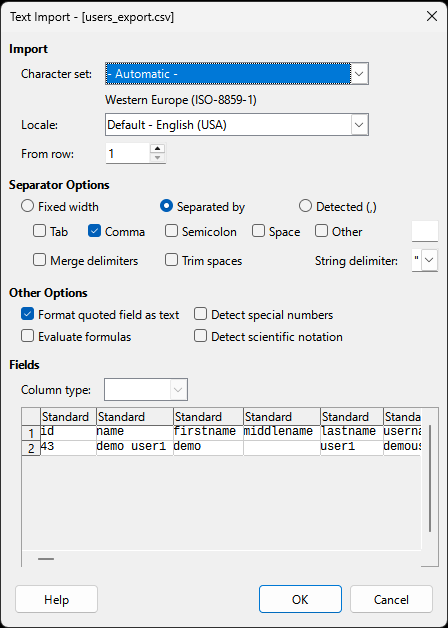
When opening the exported CSV you'll need to set the following.

1. Character set: UTF-8
2. Separated by Comma
3. Format quoted fields as text
4. " as string delimiter


Kyle (Krileon)
Community Builder Team Member
Before posting on forums: Read FAQ thoroughly + Read our Documentation + Search the forums
CB links: Documentation - Localization - CB Quickstart - CB Paid Subscriptions - Add-Ons - Forge
--
If you are a Professional, Developer, or CB Paid Subscriptions subscriber and have a support issue please always post in your respective support forums for best results!
--
If I've missed your support post with a delay of 3 days or greater and are a Professional, Developer, or CBSubs subscriber please send me a private message with your thread and will reply when possible!
--
Please note I am available Monday - Friday from 8:00 AM CST to 4:00 PM CST. I am away on weekends (Saturday and Sunday) and if I've missed your post on or before a weekend after business hours please wait for the next following business day (Monday) and will get to your issue as soon as possible, thank you.
--
My role here is to provide guidance and assistance. I cannot provide custom code for each custom requirement. Please do not inquire me about custom development.

Please Log in or Create an account to join the conversation.

  • Ake2017
  • Ake2017
  • ONLINE
  • Posts: 64
  • Thanks: 1
  • Karma: 0
4 days 15 hours ago - 4 days 15 hours ago #343486 by Ake2017
Replied by Ake2017 on topic How to export members to Excel
Yes, krileon,

I did all that. My problem is still as described.
I suggest that a new export solution is implemented.

Regards / Ake2017
Last edit: 4 days 15 hours ago by Ake2017.

Please Log in or Create an account to join the conversation.

  • krileon
  • krileon
  • ONLINE
  • Posts: 50237
  • Thanks: 8598
  • Karma: 1470
4 days 12 hours ago #343487 by krileon
Replied by krileon on topic How to export members to Excel
The CSV opens fine in LibreOffice and Google Sheets. We also provide JSON and XML export. I believe your settings maybe incorrect somewhere. Below are screenshots of it exporting fine and opening fine.

Open
 

CSV
 

Plain Text


Kyle (Krileon)
Community Builder Team Member
Before posting on forums: Read FAQ thoroughly + Read our Documentation + Search the forums
CB links: Documentation - Localization - CB Quickstart - CB Paid Subscriptions - Add-Ons - Forge
--
If you are a Professional, Developer, or CB Paid Subscriptions subscriber and have a support issue please always post in your respective support forums for best results!
--
If I've missed your support post with a delay of 3 days or greater and are a Professional, Developer, or CBSubs subscriber please send me a private message with your thread and will reply when possible!
--
Please note I am available Monday - Friday from 8:00 AM CST to 4:00 PM CST. I am away on weekends (Saturday and Sunday) and if I've missed your post on or before a weekend after business hours please wait for the next following business day (Monday) and will get to your issue as soon as possible, thank you.
--
My role here is to provide guidance and assistance. I cannot provide custom code for each custom requirement. Please do not inquire me about custom development.

Please Log in or Create an account to join the conversation.

  • Ake2017
  • Ake2017
  • ONLINE
  • Posts: 64
  • Thanks: 1
  • Karma: 0
3 days 13 hours ago #343488 by Ake2017
Replied by Ake2017 on topic How to export members to Excel
Well, it does not open fine in -my- LibreOffice.
I verified my Opening settings, they are similar to yours (but Swedish instead of English).
And the result is as I have written before, that the GID column is split into several columns.

However, when I open my exported csv file in the text editor it shows the GID column differently from your file.
I see ...0,""[""""2"""", """"11""""]"",2015... (GID in the middle) -- whereas you see ...0,"[""2"", ""3""]",2012...

So, it seems that my exported file is different from yours. And that may explain why my embedded comma results in a new column.
So why is that? (My CB is ver 2.11.0 and my Joomla is 5.4.1)

Please Log in or Create an account to join the conversation.

  • krileon
  • krileon
  • ONLINE
  • Posts: 50237
  • Thanks: 8598
  • Karma: 1470
1 day 13 hours ago #343490 by krileon
Replied by krileon on topic How to export members to Excel
Please be sure you've the latest build release installed. The export/import improvements aren't in a stable release yet (2.11.1).

forge.joomlapolis.com/issues/9733


Kyle (Krileon)
Community Builder Team Member
Before posting on forums: Read FAQ thoroughly + Read our Documentation + Search the forums
CB links: Documentation - Localization - CB Quickstart - CB Paid Subscriptions - Add-Ons - Forge
--
If you are a Professional, Developer, or CB Paid Subscriptions subscriber and have a support issue please always post in your respective support forums for best results!
--
If I've missed your support post with a delay of 3 days or greater and are a Professional, Developer, or CBSubs subscriber please send me a private message with your thread and will reply when possible!
--
Please note I am available Monday - Friday from 8:00 AM CST to 4:00 PM CST. I am away on weekends (Saturday and Sunday) and if I've missed your post on or before a weekend after business hours please wait for the next following business day (Monday) and will get to your issue as soon as possible, thank you.
--
My role here is to provide guidance and assistance. I cannot provide custom code for each custom requirement. Please do not inquire me about custom development.

Please Log in or Create an account to join the conversation.

Moderators: beatnantkrileon
Powered by Kunena Forum