

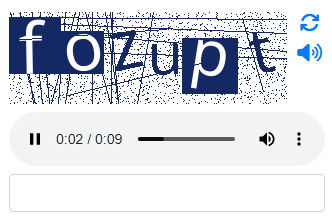
We are thrilled to announce CB AntiSpam 7.0.0, a major stable release with new ways to block suspicious traffic and substantial improvements to internal captcha generation.
Audio captcha with a full player
Audio output now exposes the full audio player, with pause, rewind, playback and volume control. That helps people using devices that mute audio by default to still access this accessibility feature.
Captchas that fit
Sizing is now font based instead of a predefined height, so characters no longer overlap or get cut off. The height setting now acts as a minimum to keep a minimum scale for the image. A new maximum width parameter allows captchas to wrap onto multiple lines, which is useful for question or math based captchas.
Modern fonts and stencils
The captcha no longer randomizes between multiple fonts. It now defaults to the Noto Sans font, which is multi-lingual and works across languages. You can still use previous fonts, and stencil characters are now supported for any font family, toggled on or off with a new parameter.
More ways to block
There are now three new ways to block, based on Operating System, Browser and User Agent. Commercially built bots send a valid user agent, so you can, for example, block forms from access by a specific tool. Failed attempts are logged and can be used for automatic blocking.
Before You Update
CB AntiSpam 7.0.0 requires Joomla 4 or newer, though Joomla 5 or 6 is recommended.
See all features on the CB AntiSpam product page. For the details of this release, read Kyle's blog post.
Active Professional and Developer members can UPDATE now with CB Install from Web. Explore a Professional or Developer Membership to get started with our extensive suite of Community Builder Add-Ons.